Low-Code Is Dead… Ish. From Canvas Hacks to React Apps

For years, Microsoft has been selling the dream of Low-Code/No-Code: business users dragging boxes onto a Canvas, wiring up some Power Fx, and shipping “apps” without ever touching “real code.”

That era might be coming to an end.

If you’ve missed the recent announcements around Generative Pages in model-driven apps (docs here), let me put it bluntly:
👉 Microsoft is now letting you prompt your way into React code running within the Power Platform.

You read that right. Beneath the pretty maker studio UI, your app is no longer just a quirky YAML with formulas glued on top. It’s React. Real code. A pro developer’s framework.

And while you can’t directly manipulate the code today, let’s not kid ourselves. If the code exists in the backend, the next logical step is exposing it. At that point, “makers” stop being Low-Code hobbyists and start working in an environment where everything you build is by definition Pro-Code under the hood.


Why This Matters: Canvas Apps Are the Walking Dead

Canvas apps have been Microsoft’s big Low-Code poster child. Drag, drop, squint, hack together logic with Power Fx, and pray your delegation warnings don’t tank performance in production.

But ask yourself:

  • Would you trust a mission-critical banking or healthcare process to a canvas built on top of spaghetti formulas?
  • Would any professional developer inherit a Canvas App and thank you for it?

Exactly.

Microsoft knows this. And that’s why the shift is happening:

  • From Low-Code hacks → to Pro-Code foundations.
  • From business hobby projects → to enterprise-ready apps.
  • From citizen dev “I made this” → to “Consultants and business can both work on this.”

Canvas apps won’t disappear overnight, but make no mistake: they are becoming the VHS tapes of Power Platform. Nostalgic, clunky, and doomed.


The Big Upside: A Community Ready to Evolve

This is actually fantastic news. Why? Because for the first time, Power Platform makers are building on top of technology that pro devs actually respect.

React is everywhere. Every dev shop hires React talent. Suddenly, those “weird Power Apps” in the corner of your business are future-proof:

  • Easier for pro devs to adapt. No more “what is Power Fx and why does it look like Excel’s evil twin?”
  • Better ALM. With apps grounded in actual code, the days of Power Automate connection reference nightmares may finally fade away.
  • Business-critical by design. If you want your Power Apps to run core processes, you want them running on real code—not a drag-and-drop toy.

The Provocative Take: Low-Code Isn’t “Dead”… It’s Reborn as Pro-Code

Let’s be clear: Low-Code isn’t disappearing. It’s transforming.

The promise of Low-Code (faster delivery, more accessible tooling, easier experimentation) will remain. But the foundation is shifting from fragile pseudo-code (Canvas + Power Fx + connectors duct-taped together) to robust, industry-standard codebases.

That’s the real revolution here:

  • Business makers will still drag, drop, and prompt.
  • The platform will compile those prompts into professional-grade code.
  • Developers will finally have a sane way to extend, govern, and maintain those apps.

If you thought “fusion teams” were a buzzword before, wait until everyone is technically a React developer by default.


A Future Without Power Automate Nightmares?

Let me dream a little here. If Microsoft keeps doubling down on pro-code foundations in Power Platform, maybe—just maybe—we’ll finally:

  • See the end of brittle Power Automate spaghetti flows.
  • Eliminate connection reference chaos that breaks ALM pipelines.
  • Build real software on Power Platform that lasts a lifetime.

The citizen dev name finally makes sense now. The “dev” part will actually be true 😀
We’re all pro coders now.


TL;DR

  • Microsoft is quietly killing Low-Code as we know it.
  • Canvas apps are already on life support.
  • Generative Pages prove Power Platform is shifting toward real pro-code (React).
  • This is a huge win for the community: easier ALM, pro dev collaboration, and apps that can actually be business critical.

👉 Low-Code isn’t dead. It just grew up.

Low Code Vibezzz: Can Power Platform Catch the Vibe Coding Wave?

What If Microsoft Could Start Over with Power Platform?🤔

The world didn’t change overnight when AI arrived at our doorstep—it’s been creeping in for years. Quietly embedding itself into release notes, keynote demos, and C-level posts about copilots. But something has shifted recently. It’s not just about AI anymore. It’s about how we build.

Enter Firebase Studio—Google’s latest tool that reimagines app development in an AI-first world. You type a prompt. You get a working app. No need to understand frontend or backend development to get going.

To be honest, it’s not no-code or pro-code. It’s something new:
Vibe coding—live-coding an app while vibing with an AI.

But it raises a big questions:

If Microsoft could rebuild Power Platform today from scratch—would they? Should they?


🧱 Power Platform: An amazing Low-Code product from Microsoft

Let’s be clear—Power Platform is a success. It has matured into a serious contender in enterprise low-code. It integrates deeply into Microsoft 365, Azure, and Dynamics. It empowers organizations to build apps fast, with governance and security built-in. That’s huge💪🏼

But like every long-running platform, it carries legacy and complexity that customers unfortunately need to understand.

  • Canvas vs. model-driven.
  • Custom pages vs. screens.
  • ALM pipelines that almost work well, but are still too complex for makers.
  • Two devs working on the same app? Still tricky.

Power Platform is constantly evolving, but having a hard time reinventing. Features are added, yes. Power FX, Copilot, co-authoring (kind of). But it’s like adding smart tech to a legacy car. You still feel the steering pull.


🤖 Vibe Coding: The New Developer Mindset

Firebase Studio isn’t just impressive because of what it can do—it’s impressive because of how it makes you feel while building. You’re not clicking through menus or configuring controls—you’re coding through conversation. It understands intent, backend structure, and front-end flow. It speaks your developer language.

That’s vibe coding.

And it changes the entire mental model of app development. It doesn’t feel like low-code—it feels like the fastest way to get real code out of your head and into a product.

Microsoft’s Copilot in Power Apps made an early push in this direction, but the experience felt more like autocomplete than a creative partner. There’s still a gap between vision and execution—and that’s what vibe coding is beginning to fill.


🍎 Are We Even Comparing the Same Fruit?

This is where we need to slow down. Comparing Power Platform to Firebase isn’t really apples-to-apples.

Power Platform is primarily about apps within organizations. It’s designed for internal users—business analysts, operations teams, HR, finance etc etc. The goal is to automate, digitize, and streamline internal processes, not launch a consumer product.

Firebase, on the other hand, is focused on external-facing apps. Think: public apps, customer portals, mobile-first products. It’s optimized for scale, authentication, telemetry, and UX polish.

So when people ask which platform is “better,” maybe we’re asking the wrong question. These tools are solving different problems for different audiences.

But here’s the thing: what if Power Platform could serve both?


🌍 Should Microsoft Blur the Lines?

Right now, if you want to build an external-facing app with Power Platform, your path usually leads to Power Pages—a separate product, with its own learning curve and licensing model. But what if Power Apps could evolve to let you publish customer-facing apps without leaving the platform?

💡Could Power Platform adopt more external scalability features?
💡Could it support richer public UX design options natively?
💡Could it blur the line between internal tool and external product?

If Microsoft wants to meet the expectations of the next generation of developers—raised on vibe coding, AI chat loops, and fast product delivery—these are questions worth asking.


💸 Pricing Models: A Mindset in Disguise

Firebase’s pricing is based on usage—you pay for authentication, reads, writes, bandwidth. It feels like you’re scaling your cost with your success.

Microsoft’s Power Platform pricing has historically been harder to navigate: per user, per app, per plan, per… something. Recent changes have simplified this somewhat, especially with the Developer Plan and Pay-As-You-Go licensing. But many organizations still feel that cost becomes a question before innovation can even begin.

This difference isn’t just a billing structure—it’s a reflection of platform philosophy. Microsoft monetizes the potential to build. Google monetizes the outcome of building.


💡 Power Platform: Building the Bridge Between Low-Code and Pro-Code

So here’s where we land.

Power Platform has done incredible work empowering business users to build. But the future of app development won’t be about choosing between low-code and pro-code—it’ll be about combining them, in a seamless, AI-driven workflow.

That’s what vibe coding hints at.

If Microsoft can continue to build that bridge—bringing Copilot closer to being a real dev partner, simplifying collaboration, supporting external users natively, and making the pro-code experience feel native, not bolted on—then Power Platform won’t just keep up… It will lead.

Because the real challenge ahead isn’t just catching up to new tools.
It’s embracing a new way of thinking about what an app is—and who it’s for.

Power Platform Low-Code Plugins: A Step Forward or Sideways?

Microsoft’s vision for the Power Platform has always been about enablement. “Low-code, no-code” has enabled many makers to build business applications without writing traditional code. It’s an attractive idea—why rely on scarce pro-dev resources when we can empower citizen developers to build what they need?

But then, there’s the reality. And reality often doesn’t align with the marketing slide decks.

The Promise of Low-Code Plugins

With the introduction of Power Platform Low-Code Plugins, Microsoft is making a push to bring more low-code automation into Dataverse without requiring full-scale C# development. This is positioned as a way for makers and consultants to extend Dataverse business logic without writing actual “code.” Instead, Power FX—the formula language familiar from Canvas Apps—is now the tool of choice for defining business logic inside Dataverse.

Sounds great in theory. But in practice? Well…

Power FX: The Wrong Tool for the Wrong Job

Power FX was originally designed as an Excel-like expression language for Canvas Apps. It made sense in that context—business users working with familiar formula structures to manipulate data and UI elements. But introducing Power FX into the Dataverse backend, for things like plugins and actions and custom API’s? That’s where I’m starting to become more skeptical.

The biggest challenge? Documentation and consistency.

Power FX has been evolving rapidly, and Microsoft’s documentation often lags behind its features. Unlike C#, which has decades of well-documented patterns, Power FX still feels like a moving target. That’s a serious problem when you’re expecting makers to build business-critical logic with it.

Another issue? Limited debugging and developer tools. If you’ve worked with C# plugins in Dataverse, you know there are well-established debugging workflows, ALM processes, and mature developer tooling. Power FX inside low-code plugins lacks much of this maturity, leaving makers and consultants with trial-and-error debugging experiences that feel more like “guess-and-check” than actual software development.

The Rise of the “Semi-Devs”

A common argument for low-code plugins is that they enable a new breed of “semi-devs”—makers who aren’t full-blown pro developers but need more control than what business rules offer. But instead of making things easier, Power FX in low-code plugins risks creating a knowledge gap that is harder to bridge:

  • Too complex for true no-coders (who are used to simple workflows and Power Automate)
  • Too limited for pro-devs (who would rather use C# plugins and proper ALM practices)

The result could be a language that neither no-coders nor pro-devs fully embrace.

Is This Really the Right Evolution?

Low-code development has its place. But if the goal is to reduce friction in extending Dataverse, introducing Power FX for backend logic might not be the answer. Instead of making things easier, it risks:

  • Creating a fragmented development experience (Canvas Apps vs. Model-driven Apps vs. Power Automate all having different functions available)
  • Complicating long-term maintainability (A language still in its early stages that could suddenly deprecate functions needed to run)
  • Forcing makers to learn yet another Microsoft language that doesn’t have the same depth of community support as C# or JavaScript

Conclusion: Proceed with Caution

The dream of empowering non-developers to build business applications is a good one. But Power FX for low-code plugins feels like a compromise that benefits neither no-coders nor pro-devs. It’s yet another Microsoft experiment in bridging the gap between citizen developers and traditional software engineering—and I am going to wait a moment before jumping on any train.

For now, the best approach? For me personally, I am going to stick to the pro-code approach. My reason: knowing that what I do will most likely work without interruption for the next years. Sometimes there is no obvious right or wrong, but you have to commit to your decision knowing the potential consequences.

Power Pages available in Norway

In 2022, I was among the first to announce a significant development: Norway had officially gained Dynamics capabilities, thanks to the new Norwegian data center. This was a major milestone for Norwegian companies, particularly for those requiring data residency within Norway. With the arrival of local Dynamics and Power Platform services, businesses could now operate within our borders.

Welcome CRM19

However, while this was exciting news, many customers expected to be able to migrate immediately. The reality was that several services were not yet fully available. Notably, Power Pages and CI-J (aka Marketing) were missing from the initial Dynamics offerings. Fortunately, some things have changed. As of now, you can install Norwegian Dynamics and Power Platform solutions and deploy a Power Pages solution hosted in Norway. ✅👏🥳

Did you know??

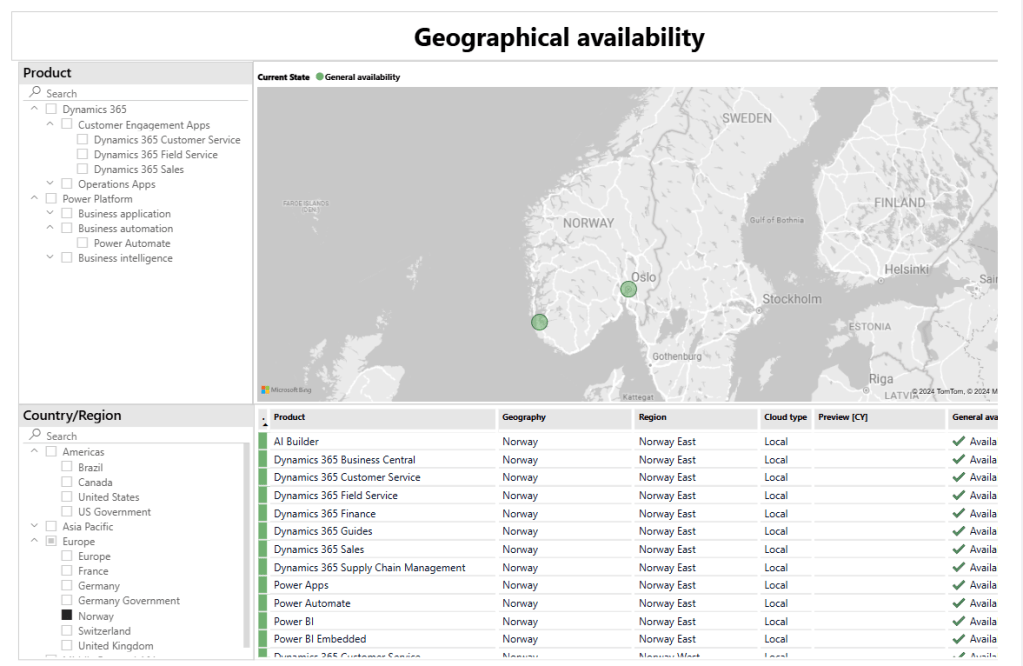
Microsoft provides an official dashboard that shows what services are available in each data center. While some services, like CI-J (aka Marketing), are not currently available in Norway, this could change in the future. It’s essential to check these details when selecting a region for your Dynamics or Power Platform deployment, as some limitations may affect your choices.

POWER BI AVAILABILITY REPORT

Ribbon Editor Updates: Hide/Show Buttons and Customize NEW Button

Since my last post Advanced Settings Facelift was about old things getting a facelift, I thought I would be ok to continue on another similar post. This time it’s about the good old ribbon.

It’s no news that the ribbon is possible to edit in the make.powerapps view, but we all know that the functionality there has been so poor that you mostly end up customizing the buttons in the good old Ribbon Workbench from Scott Durow. Not that there is anything wrong with the tool, but Scott works for Microsoft ATM, and maintaining an amazing tool like that is not future thinking.

A few days ago, I stumbled upon a post on Twitter/X from Robin that mentioned new updates to the Command Bar (Ribbon Editor in Make). The video might seem a bit simple, but we have to look behind the simplicity to see the complexity 😃

Whats new?

We are now able to Hide/Show (without formula for now) the following buttons

The hide is currently only located on the left side menu

You are probably going to ask yourself WHY exactly these buttons and not all? Well, there seems to be a lot of technical things behind the scenes where a button isn’t just a button. A CRM button isn’t even the same as a Dataverse button in the backend according to sources. We could all complain about this, since RibbonWorkbench doesn’t seem to even care about any of this, but let’s focus on the positive parts here. WE ARE ONE STEP CLOSER 🙂

Next update was the possibility to modify the actually NEW button

This is the first time we have been able to customize an OOTB button with PowerFX or JavaScript. Again, you may ask why only the NEW button. I’m asking the same thing, but also accepting that it’s a step in the right direction 😂

This does bring the possibility to add cool stuff to the NEW button when in Main Grid. Have a look at the Twitter video and you might see what is going on. The button calls a JavaScript that in turn opens a Custom Page. The record itself isn’t actually ever opened. Yes, we could do this with RibbonWorkbench, but again… One step closer 😉

Why is it important?

Just to reiterate what I wrote earlier. Scott now works at Microsoft, and leaving the Ribbon Workbench unattended for the next years is not a viable option! Microsoft has to realize that the Command Bar has to get better fast. A LOT BETTER. This update might seem like a small/insignificant change, but this is jumping a few hurdles that will get us closer to the end goal. 🏁

In the future, we can hopefully retire the Ribbon Workbench and be thankful that Scott got us through a lot of hard situations😃. Just imagine the weight Scott has had on his shoulders since the release of the first Ribbon Workbench! Everyone is reliant on his work, but we all probably take it for granted every time we use it. Just think of how many hours it has saved you, and it’s designed and maintained by a single person receiving no money for it!

Model Driven App Advanced Settings – New look

We all knew it was a matter of time before the old UI would be replaced, and soon we are one major step closer to being rid of everything old UI.👏🏼👍🏼

The old Advanced Settings that so many people are used to navigating is about to get a new look, and this time as a separate APP. APP you say… Well, yes.. Just like the Sales HUB configuration, lots of parameters are not typical records in a table, and therefore it needs to represent configuration parameters in a different visual experience.

This is obviously still in preview and only available via the USA preview environment, but it should be arriving soon. Of course, there will be lots of initial bugs with this, but give it some time before it hits GA. Be constructive in the criticism and you might actually see the changes implemented 💡👍🏼

Why are some skeptical to the change?

There are 2 obvious reasons why some are still skeptical about the loss of classical UI.

  1. Advanced Find is soon GONE.
  2. Classical Solution config will also be GONE

Advanced Find has been given a new UI through the global search feature, BUT this search doesn’t include all tables. Only includes the tables that have been included in the application. This is a huge limitation for those who actively use Advanced Find a lot to really understand the underlying data.

Classic Solution Configuration is still the preferred way to navigate within a solution for many. Mostly because the navigation itself is a lot faster between entities (once loaded), and because it’s really well known for most OG’s 😉. Another point to be made is that not all configurations are possible YET in the MAKE portal (some components), but I am sure they will be rushed along once we finally land on 1 common config platform for all consultants.

Thank you to https://www.linkedin.com/in/allandecastro/ for notifying me about this preview feature.

ACDC 2024 – Why this is the ultimate hackathon

It’s almost been 3 weeks since the hackathon and I am a bit late on my summary of experiences. February has been hectic, but better late than never 🙂

I have written about ACDC earlier and they all have a bit of a different perspective each time that I participate:
ACDC 2021 – Summary
ACDC 2022 – Summary
ACDC 2023 – Summary

This hackathon provides the most unique learning experience for Microsoft techies in every single way. 13 teams locked into a giant auditorium for 3 days having a blast learning things they didn’t know before! Sure there are other hackathons with many teams, but they are not forced to eat, sleep, breathe together for 3 days straight 😂

Being humbled is a valuable learning experience

I have about 16 years of experience in this world of Dynamics / Power Apps, and have to admit that I am extremely comfortable in the space of Dynamics 365. Like many other people in my situation, it’s easy to stay inside my safe area, and let others handle technology that is not so well known. This also defeats the purpose of the hackathon.

Long story short, Nick Doelman contacted me this year asking if he could be a part of Point Taken’s team, and I was instantly intrigued about it. I know him as an MVP, but we haven’t hung out a lot before. Nick is one of the best you can get on Power Pages, and is generally a very high end consultant within Dynamics / Power Platform. It was given that he would provide the team with a lot of important knowledge, so we agreed to give it a go. Ohhhh what a joyful experience it was! 🥰

Nick’s first demand was:

No one is going to do what they normally do in their everyday work!

Nick Doelman

Probably a bit dramatic quoting him like that, but what’s not to love with a little theatrics😂 The main reason for him to say this was because we are here to learn. If we end up solving Business issues like we do every single day, we could just as well stay at our customers and billed hours. He literally pushed us out of our comfort zone even before we had started. We all agreed that it would be fun, but none of us at this point were sure what to expect.

Nick took the lead on the app that would be the main point of our delivery. In short, it was a Canvas app (😂”low code”😂 ) that would use OpenAI to randomly generate maps for a game. Not only was the game randomized, but the themes would also be random based on keywords entered at the beginning of the setup. Read more about our app below⬇️

What impressed me the most was seeing how Nick embraced the new technology that he hadn’t worked a lot with yet, while mastering highly advanced elements in such a short time. I do often mention the quote of the “Old dog new tricks”, but it’s a real feeling. Having the energy to constantly learn new technology is not easy.

While sharing his knowledge with the team, he also showed us some really important skills as a consultant. His logical approach to solve a problem, and his ability to talk about what was going to be solved. A good sales pitch itself can land large scale projects even before the customer has seen any evidence that it works. This could also have been on of our problems as a team, because the first day pitch was so amazing that we almost couldn’t deliver on our promise in the end😂

I consider myself a quick-thinking consultant with a charm that usually helps me win projects. However, Nick’s many years of experience not only nailed the pitch but also showcased how to be a top-notch consultant in all aspects during a challenging 3-day hackathon. I’m not trying to be Nick – I’m Thomas. I can take his wisdom and make it work with my own style, learning and growing in the process.

That is the core value of ACDC https://arcticclouddeveloperchallenge.net

Final Delivery

Interested in seeing what we did, have a look at our blog post

Security Roles – The 3 Phases

Security Roles the least fun part about Power Platform – Dataverse / Dynamics 365. I would rather use hours finding the right ICON for every single custom entity😂. Yet security roles happen to be the pilar of why our platform is so much more powerful than other technical platforms.

I find that my approach to security roles almost always ends up the same way when I deliver new solutions. Therefore I thought I would share a bit of what goes through my mind in the different stages:)

1. Creating the role

There are many blogs about creating roles, and recently we even received a new modern way of modifying security roles. I’m not going to cover the hows, but you can pick up a few tips from the following blogs:

Blogs about the new ways of creating roles:
https://learn.microsoft.com/en-us/power-platform/admin/security-roles-privileges
https://malindonosomartnes.com/2023/06/29/new-security-roles-admin/
https://nishantrana.me/2023/05/01/manage-security-roles-using-the-new-modern-ui-preview-power-platform-admin-center/

What I do want to share is my personal opinion on where to start. As you know I mostly work with Dynamics 365 and not pure Power Platform environments. If I am delivering a Sales solution I almost always start off by copying the Salesperson’s security role.

Don’t ever start a security role from scratch. It’s simply not worth the time.

So for Dynamics sales I would typically just copy the Salesperson as a start

And for Power Platform I might start with Basic User as a start.

A typical error I do is hoping that I can end up with a single security role to make things simple. Pushing all users into the same role because why not. I am one for more access to users, and depend on teaching people to handle data with respect. Within the first few weeks, you soon realize that you probably need an admin role for administrative tasks.

PS: One thing I always do is of course to limit any delete actions for ALL users the first few weeks so that they don’t blame the system for GHOST deleting items. Yes, that has happened! 🤷‍♂️

2. Assigning the role

After hours of banging your head on the wall, trying to figure out what security privileges you are missing for the application to work as expected, you arrive at the next task of assigning the security roles to the users.

The next error that I have done more than once is thinking that we can manage the security roles directly on the user. To begin with I use a tool like XrmToolBox to deploy roles to multiple users at the same time, but a few weeks/months down the line people hired/fired/re-org having to make these changes often is going to take way too much time. Having to bill for these changes is also going to be frowned upon because it’s “just a simple task”.

Traditionally this has been very straightforward for the sales and customer service users, but lately, this is becoming more and more of a challenge. With the release of new functions, you will soon understand that keeping up with security roles is almost impossible. With new solutions from Microsoft being installed automatically, you might also see a few security roles to follow along. Examples of this would be the Forecasting functionality to sales.

Normally one would think “Let’s just add these to the main security role for all users” BUT there are times when the actual security role ID/Name is the one opening up the functionality.

The Dynamics 365 app for Outlook User is one of these apps I believe. In order to actually qualify for the app deployment, you need this security role.

So my first initial thought that one user could have “Salesperson” as a single role with all of the functionality is now turning into a nightmare handling pr user. I now have to manage lots and lots of users/changes etc while trying to maintain the correct roles given.
The image below is just an example

3. Structuring the security roles with teams

This leads us to the final phase of security roles for me, where I realize that I should have done things right from the beginning. Using the extra time early on so that I save time when the project is live😤

Just like marketing people are oddly obsessed with personas, we have to think about what types of users do we expect to see in Dynamics / Power Platform. In a simple solution, you could easily have the following personas.

  1. Sales User
  2. Sales Admin
  3. Marketing user

Dynamics users are well aware of teams being able to connect security roles, but Power Platform users are not always aware of this.

Create a team, add users, and then add the security roles. This is a much simpler way of managing changes in security roles because changes only need to happen in 1 place.

Hold up

The problem with this solution is that Dynamics / Power Platform consultant or someone familiar with Dynamics / Power Platform needs to make these changes. In a worst-case scenario, a company would have IT create a user and assign a license. THEN they would have to contact other consultants to add security roles or add someone to the team for correct access. This method is flawed and will at some time become a problem. Microsoft has fortunately given us a great solution for this.

Solution✅ – AAD Security Groups / Entra Identity Security Group

I am not going to cover how to create a security group in AD and later on, add it to Dynamics / Dataverse. Have a look at the following posts for these tasks:

https://learn.microsoft.com/en-us/power-platform/admin/manage-group-teams#create-a-group-team
https://forwardforever.com/how-groups-teams-work-in-power-apps-dataverse/

What I think is so important about the Security Group is that it removes the burden of access from the Dynamics / Power Platform consultant, and puts it in the hands of IT managing general access to all systems in AD. This just makes so much more sense, because these people normally do the on/off-boarding for all technical aspects. All you have to worry about is that security roles are given to the correct team.

Within Dynamics / Dataverse there is no difference in how to assign security roles BUT there is a major difference in having the members auto-populated based on AD security groups.

Moral of the story

Use Security Groups unless you have a very good reason not to 😘

Dynamics 365 AI code with ChatGPT

By now I am sure most of you have heard about ChatGPT. The AI product is pouring out surprisingly intelligent responses to all sorts of questions that people all around the world have given it lately.

There have been examples of the tool writing papers for school, creating blog posts for people, and helping formulate fairly complex text for webpages and marketers. One thing that someone tipped me off about was the ability to write code, and I was a bit curious as to what that would mean.

So one of the many gaps in my knowledge is specifically regarding Plugins. A plugin is a piece of backend code that runs in real time when triggers occur in Dataverse. I tried doing a little plugin with some help a few years ago and wrote about it on the Company Blog – Plugin in 1 hour.

I was curious how ChatGPT would do with a similar issue, so I took it for a spin😊

Question

First off I started out with a question that you write the same way you would anything Google/Yahoo/AltaVista/Bing/AskJeeves/DuckDuckGo/etc etc etc

The response I get is fairly spot on. Certainly, some will comment about something not being 100% accurate here, but this is more than good enough and quite well-written!

This wasn’t exactly what I was hoping for, so I asked a follow-up question to my original question.

It thought for a few moments before it started spitting out CODE!! 🤯🤯🤯🤯 (above is just a snip of the total code. I put it all in a code box below).

using Microsoft.Xrm.Sdk;
using Microsoft.Xrm.Sdk.Query;
using System;
using System.Linq;

namespace MyPlugins
{
    public class SumProductValues : IPlugin
    {
        public void Execute(IServiceProvider serviceProvider)
        {
            // Obtain the execution context from the service provider.
            IPluginExecutionContext context = (IPluginExecutionContext)serviceProvider.GetService(typeof(IPluginExecutionContext));

            // Obtain the organization service reference which you will need for CRUD operations.
            IOrganizationServiceFactory serviceFactory = (IOrganizationServiceFactory)serviceProvider.GetService(typeof(IOrganizationServiceFactory));
            IOrganizationService service = serviceFactory.CreateOrganizationService(context.UserId);

            // Retrieve the Opportunity record that the plugin is running against.
            Entity opportunity = (Entity)context.InputParameters["Target"];

            // Create a query to retrieve the related products.
            QueryExpression query = new QueryExpression
            {
                EntityName = "product",
                ColumnSet = new ColumnSet("productid", "price"),
                Criteria = new FilterExpression
                {
                    Conditions =
                    {
                        new ConditionExpression
                        {
                            AttributeName = "parent_opportunity_id",
                            Operator = ConditionOperator.Equal,
                            Values = { opportunity.Id }
                        }
                    }
                }
            };

            // Retrieve the related products.
            EntityCollection products = service.RetrieveMultiple(query);

            // Sum up the value of the products.
            decimal totalPrice = products.Entities.Sum(product => product.GetAttributeValue<Money>("price").Value);

            // Update the Total Price field of the Opportunity record.
            opportunity["totalprice"] = new Money(totalPrice);
            service.Update(opportunity);
        }
    }
}

🤯🤯🤯🤯

At this point, I was extremely excited to see that the result is pretty darn good. Sure the trigger here is based on Opportunity, and not the opportunity product, but that is beside the point. It seems that I could have formulated my question in a way that I would have understood it correctly. This is actual usable code for a plugin that could run on Opportunity level to update the sum of all Opportunity products.

Not really sure what more to write about this ATM.. Still trying to wrap my head around it all for now.

Custom Page – Close Dialog Logic

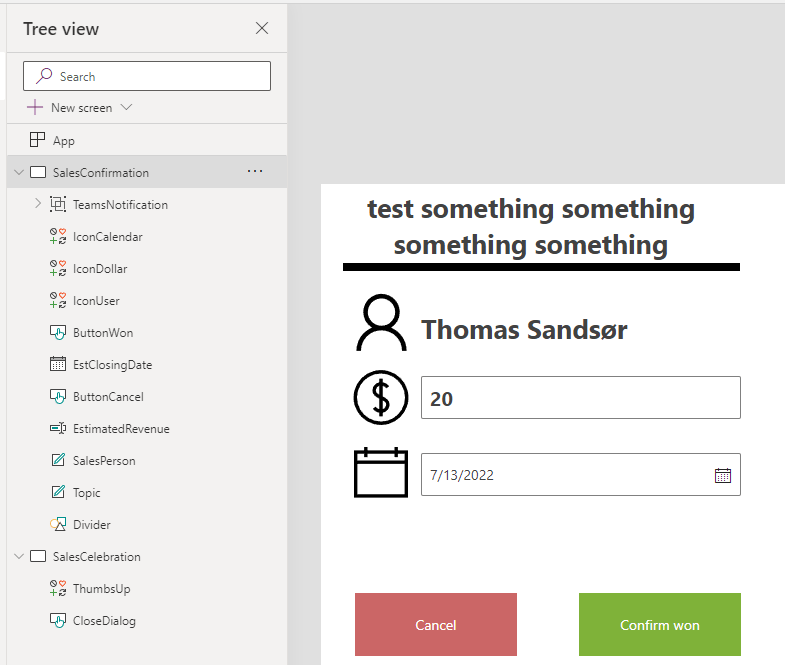
In the last post, we created a new close dialog, but we didn’t add any logic to the buttons.

Logic – Fields and Buttons

The most important parameter we send in via JavaScript last time was the GUID of the record that we are going to work with.

The first thing we do is add an onload to the app and perform a lookup as the very first step. This will give us all of the data for that given Opportunity that we can use within the Power App. We store the whole record in a variable “varOpportunity”.

A little clever step here is actually the “First(Opportunities)”. For testing purposes, this will open up the first Opportunity in the DB if you open the app without the GUID from Dynamics, and from here you can test the app make.powerapps.com studio without having to pass a parameter to the Custom Page 👍

ONLOAD

Set(VarOppportunity,
If(IsBlank(Param("recordId")),
First(Opportunities),
LookUp(Opportunities, Opportunity = GUID(Param("recordId"))))
)

Fields

Fields can now be added via the “varOpportunity” that contains all of the data to the first opportunity in the system.

BUTTONS

The cancel button only has “back()” as a function to close out the dialog, but the “Confirm WIN” has a patch statement for Opportunity.

//Patch the Opportunity fields
Patch(
    Opportunities,
    LookUp(
        Opportunities,
        Opportunity = GUID(VarOppportunity.opportunityid)
    ),
    {
        'Actual Close Date': EstClosingDate.Value,
        'Actual Revenue': Int(EstimatedRevenue.Value)
    }
);
//Hide input boxes and show confirmation
Set(
    varConfirmdetails,
    false
);
Set(
    varCongratulations,
    true
);

HIDE/SHOW

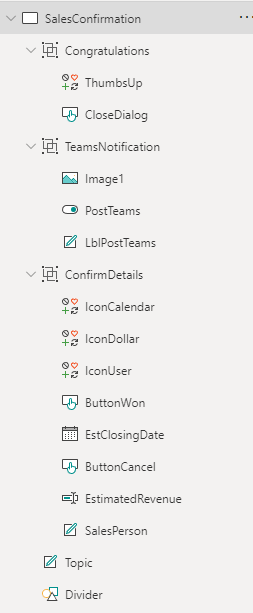
Because of some challenges I met with multiple screens, I had to use a single Screen with hide/show logic. Therefore I added all the fields to Groups and will hide Show based on groups.

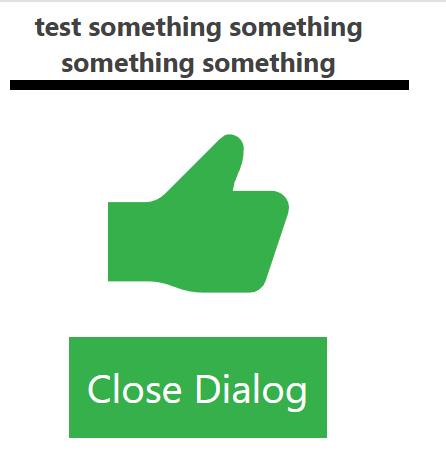
The Congratulations group looks like this.

Closing the Opportunity Challenge

If this were a custom entity we could close the opportunity by setting the Status and Status Reason values. Unfortunately, the Opportunity has a function for closing the Opportunity that will create a Case close dialog. In order for this to work, we have to call a custom service for closing the Case. This does get a bit tricky.

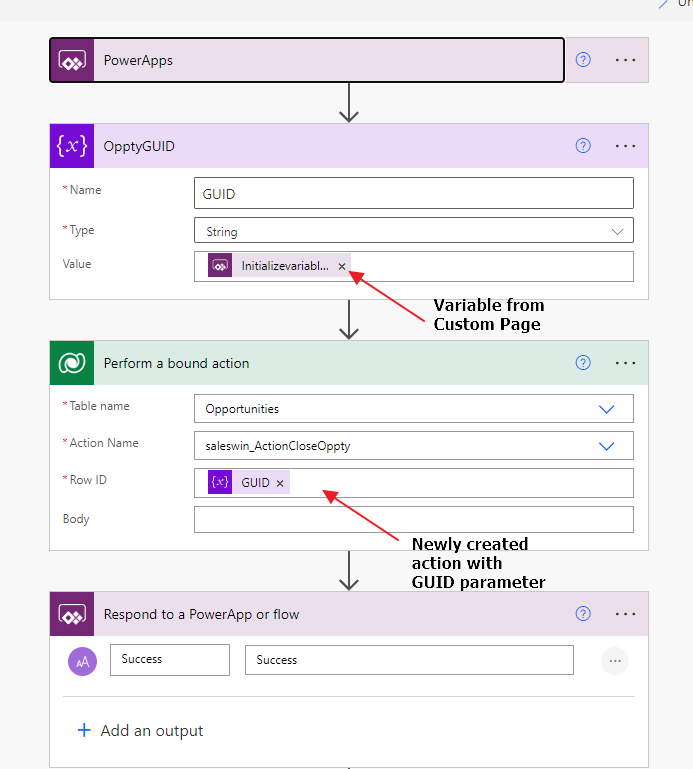
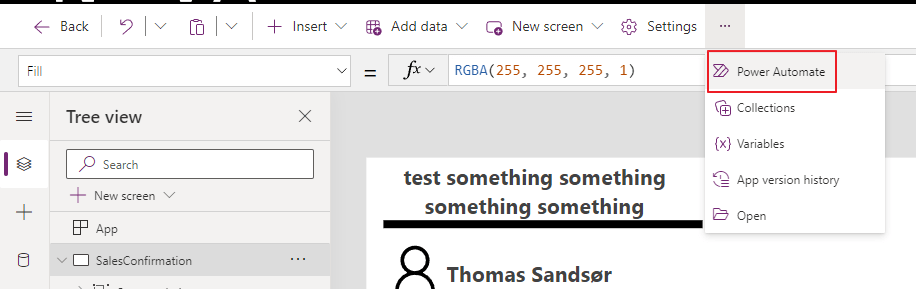
We now have to call an action from Power Automate to close the opportunity as WON. At the moment of writing the blog, the process of calling the Microsoft action in Power Automate wasn’t working, so I created my own action. I will show you how, and honestly maybe even recommend doing it this way for now. It works all of the time and uses the technology that has been working in CRM since 4.0.

Custom Action

Actions work with the same logic as a Workflow, but they can be fired at any time from anywhere. They can receive inputs, and generate outputs. A workflow will only trigger from CRUD events, and work within the context of the record triggering the actual workflow. They are in many ways an underrated function in Dynamics / Dataverse.

It’s a pretty simple step updating the status of the opportunity to “won”, and by doing it this way the system will automatically do the correct calls in the API for Opportunity Close.

This is all you need for the action. After activation, we can go back to the custom page and create a instant flow (Power Automate).

In the Custom Page we now add a line to our “Confirm WIN” button. (Yes, I know we probably should add some logic for success/fail, but that will be a part of the final solution on Github).

//Patch the Opportunity fields
Patch(
    Opportunities,
    LookUp(
        Opportunities,
        Opportunity = GUID(VarOppportunity.opportunityid)
    ),
    {
        'Actual Close Date': EstClosingDate.Value,
        'Actual Revenue': Int(EstimatedRevenue.Value)
    }
);
//Hide input boxes and show confirmation
Set(
    varConfirmdetails,
    false
);
Set(
    varCongratulations,
    true
);
//Update Opportunity Close entity
CloseOpptyPostTeams.Run(VarOppportunity.Opportunity);

WINNER WINNER 🏆🥇

You should now be able to close the opportunity as won via a custom page. Just remember to publish the custom page AND publish the app again. If not it will now show. Do remember to give it a few moments before refreshing after a change.