In Norway we have a saying “everything was better before”. It’s commonly used to describe what old people feel when things are just moving to fast, and they don’t see the purpose of the change.
The new timeline for Unified Interface has been like this for me, BUT recently things are starting to get better:)
The Old
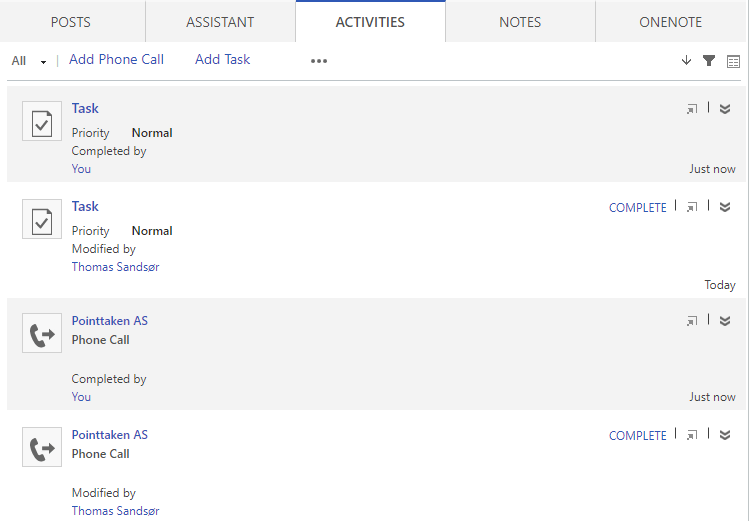
2 tasks and 2 phone calls created. Et was easy to see what type of records these were on the left side with the icon. It was also easy to see that they were not yet completed on the right side, AND that they were white.
When completing one of each I saw clearly that it was completed both with color, and the fact that the complete button was gone.
Another great feature about this was the possability to navigate (hyperlink) to the item by clicking on the phone call or task icon. Worked like a charm.
At last you had a nice feature for quick create that was really nice. The only problem though is that this was never a form we could edit, so in the big picture of things I understand why this was not continued.
The new
So the new timeline has been through a few changes, and this is the lates on wave 2 at the time of writing. They have allready made some small improvements that make it better, but lets break it down.
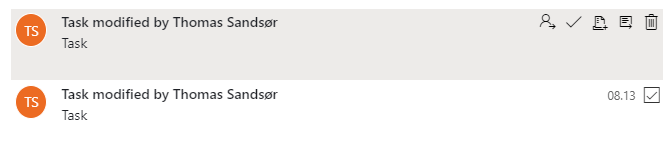
I have the same 2 tasks and phone call. On the left side I now see orange with my name. I don’t know why my name is there. Would make more sense to have the ICON of the activity type. My name should be sown in FULL as is. In a large company you have no idea who TS is.
On the right side it looks like the task is done.. Well, it isn’t.
When you hover over a task you see the color difference, and this is the first time you actually see the button for complete and open. The “check” mark is complete task, but the odd one here is the open record next to the trash can. Why is it so hard to open a record suddenly? This is absolutely not intuitive, but I guess they just need feeback on this.
WTF!
The picture below look like the one above, right? Well, in this picture I have actually completed the to phone calls. Can you tell? Nope.. A little odd to leave out the color coding for the visuals. This should be something they could fix in a small release soon i guess.
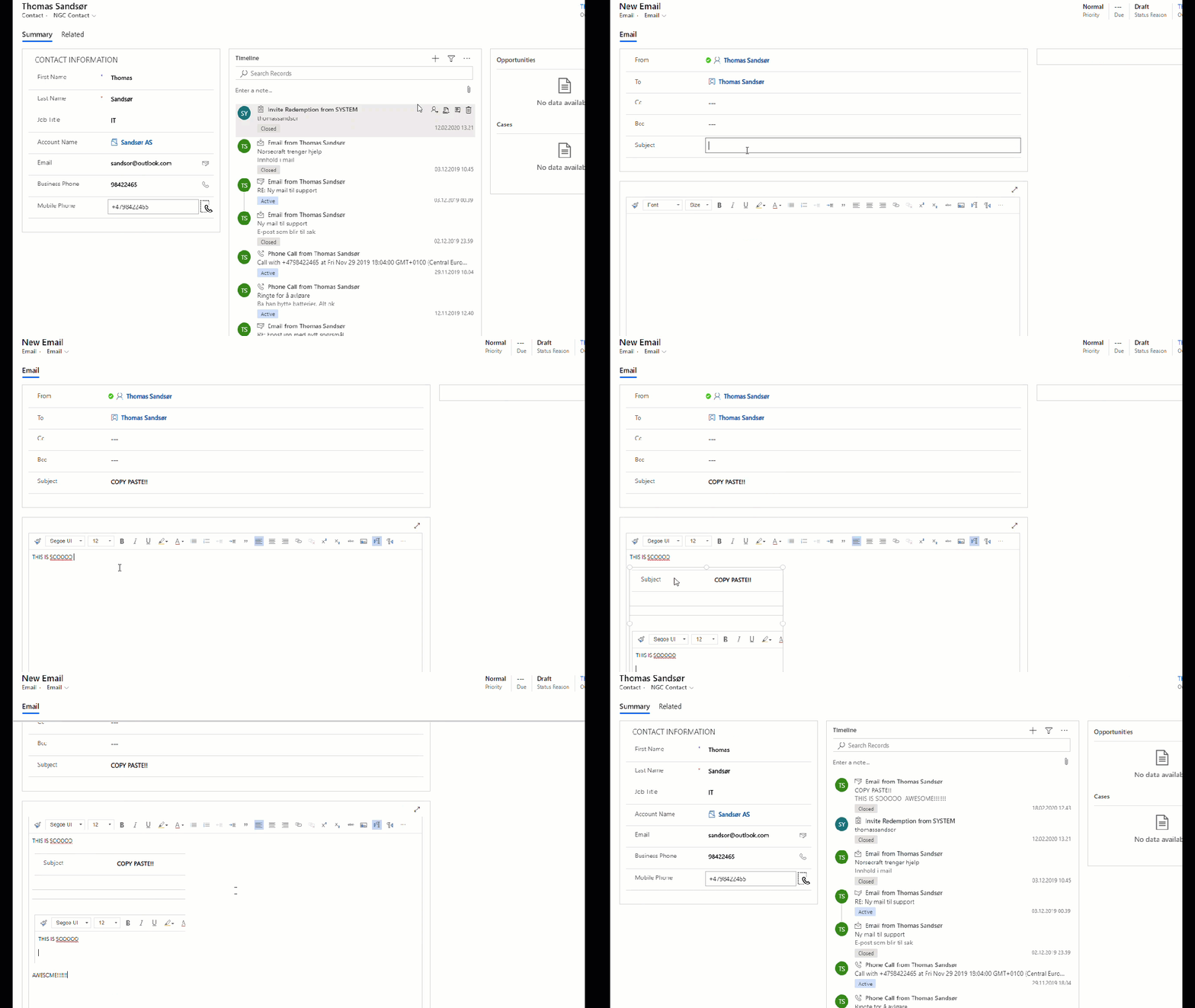
So for the new UI we have to rely on the Quick Create form instead of the nice little form on the old one. This is actually not that bad once you get used to it. On this form we have access to the fields via javascript etc, so this is not a bad thing.
Conclusion
I love the new UI because of more activities shown in less space, but they still need to understand how people use the timeline. If you really want to make sense of the timeline you need to clearly see what is todo, overdue and complete. Otherwise it doesn’t make any sense really.
PS!
Will they ever give us the option to stop the email warnings? (i mean completely gone)
I was never a fan of the Business Process Flow (BPF) because of the many flaws. Sometimes I didn’t think it was easy enough, and other times not advanced enough. It simply wasn’t what I needed.
In a recent project I decided to give it another go, because the customer wanted to continue with the BPF they had from their old CRM system.
Opening the PBF now I see that there is so much new features here that I haven’t seen before. I guess most of these features are due to the FLOW platform now taking over the BPF.
Challenge: Setting pipeline phase
I know you can report on the BPF entity, but that is more complex than reporting on the opportunity entity if you ask me.
Can I set the “Phase” field on the opportunity when navigating to the next step in the BPF? Let’s see!!
I wanted to set the Pipeline Phase with BPF
Config
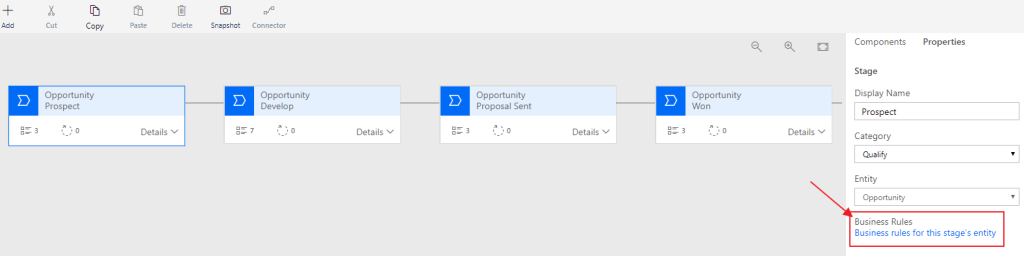
Open the Business Process Flow from your solution and notice a button at the bottom right “Business rules for this stage’s entity”.
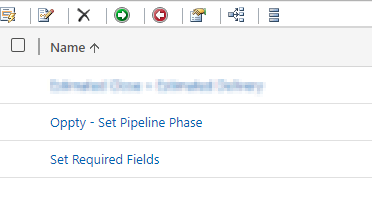
Create a new Business Rule for Opportunity “Oppty – Set Pipeline Phase”.
For the first condition we check if the BPF is in the stage named Prospect.
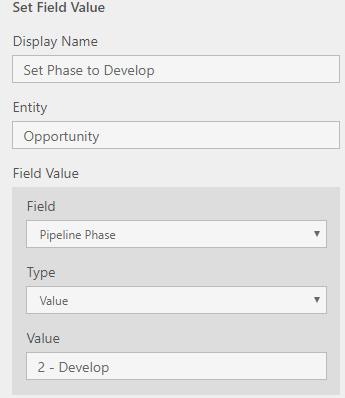
If true, set the Pipeline Phase to “1 – Qualify”.
Repeat for the second step!
The business rule should look something like this:
Result
Let’s get back to the Opportunity. We see that it default is active on the Qualify stage in the beginning of the sales process.
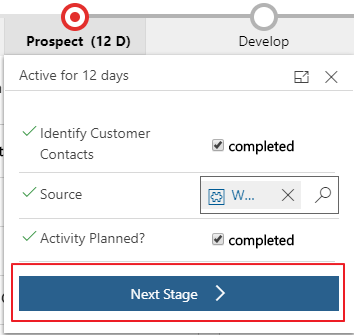
Click the next stage
And there you go!!
New Found Love
So what do I think of the BPF now? Honestly, I liked it. It might be a replacement for many other JavaScripts that I have been using the later years, and that is only a good thing. In this case I was able to skip JavaScript and therefore deliver a solution with a low technical footprint:)
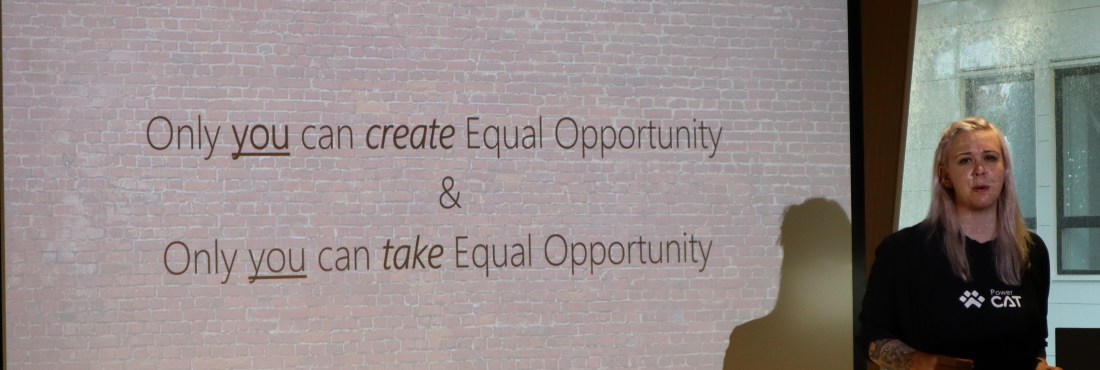
Sarah and Marius were speaking of Equal Opportunity. A highly interesting topic that is as relevant today as ever before. One slide caught my eye that I really liked.
Take ownership of your own environment. Don’t wait for others to create an equal opportunity environment, and then complain if they don’t. If you see the chance to own a situation, take it.
If there is a table you want to sit at with a chair, take the chair and sit down. Don’t wait for others to offer you a place at the table. You take it if you want to be a part of it!
Sarah Critchley (quote as I could remember it)
I have grown up in a family where the women are strong, have great educations and excel at their jobs. I am sure they have faced issues along the way, but they keep claiming their place at the table every time they can.
Malin Martnes – Extending Talent
I am sure you all know how proud I am of Malin, so I couldn’t go without writing about her. Talent is not a product with lots of customers yet, but we are working on a lot of exciting opportunities at the moment. We are always in the challenger position when talking about this product going head to head with companies that have delivered HR for many years. This often ends up in a function feature comparison, but one thing we now can focus on is the ECO-System.
Talent integrates to the CDS, and therefore we can leverage all of the cool features of the PowerPlatform. Malin showed a lot of cool examples where PowerApps were assisting in the hiring process.
What I liked about this session was hot interactive it was, and how “low code” he was trying to make it. I gained some insights to the IOT challenges when gathering messages in different ways. Also I see the impact of having a device you can pass around in the room that is working while presenting. It was showing live data on the screen, presenting different messages to us as we were passing it along. He later posted the slides on Twitter
Jukka Niiranen – Canvas vs Model
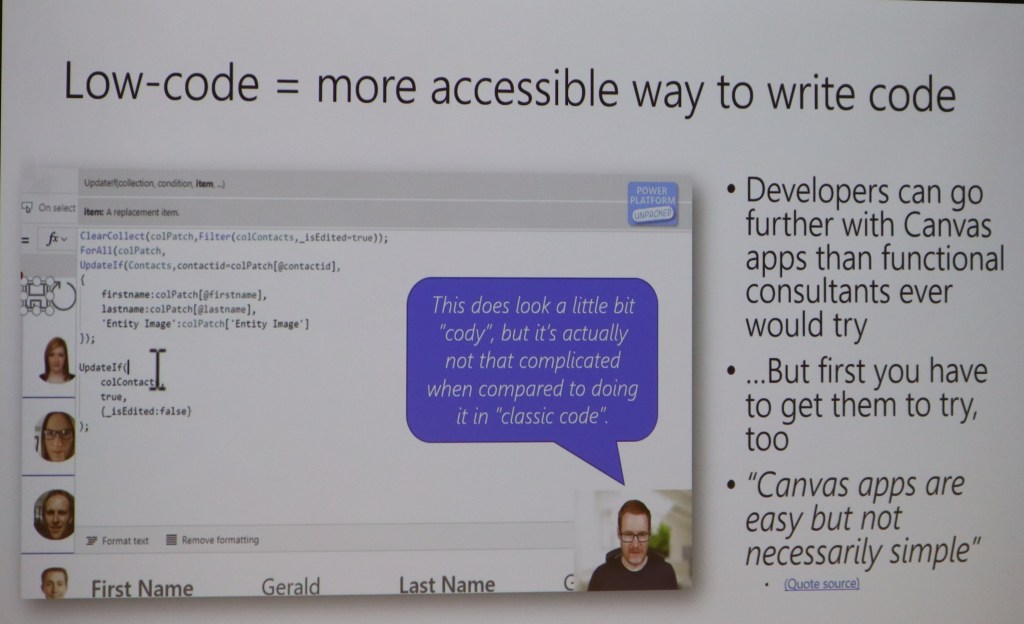
I find it interesting to listen to Jukka. He is like a rapper’s lyrics when talking. There is often some deeper meaning to what he says if you listen closely. During this session he was open and honest about his view on the Canvas apps, and the battle Canvas vs Model is now facing. Will we ever get to the point where these 2 become 1? The answer is most probably, but how!! 🙂
He also had a wonderful slide with the great Scott Durrow in focus. I think we all agree that Canvas is absolutely becoming a code app, even though it might not be complex code. As a functional consultant I say code, but a developer says “cody” to the syntax;) hehe
Mark Smith
The pictures bellow are from Mark’s session. I really loved this session because he made the participants work! The topic was CDS modeling and what you should think about. He made it clear what was out of the box, and how you should begin to think about creating new models not based on the standard applications.
Anything interactive like this is just AWSOME. The participants loved it, and had a great time while working together on the data model. Interactive learning is the best way to learn.
So in conclusion, I had a great time at this event. Hope to repeat this again next year in Oslo. I also hope to see you all again soon:)
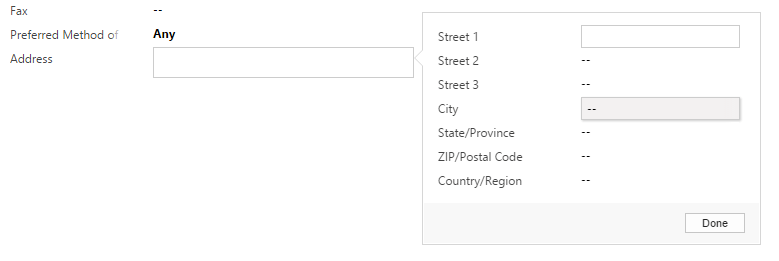
Ohhhh how I miss the Composite fields in dynamics<3
It was introduced in 2013, but was never given much love. It was one of those changes the customers loved, but always wanted to configure. This resulted in many strange javascripts that I personally refused to use. Now that the new UI is being forced upon us, the field will disappear it seems, and that is too bad. The new UI is fine, but it is not as efficient with screen space yet, fields like this actually make a lot of sense.
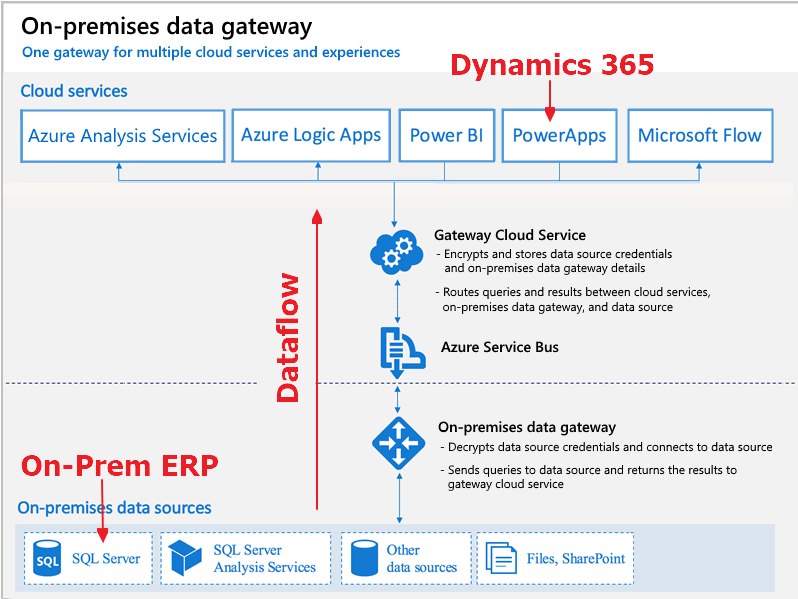
So the On-Premise data Gateway itself might not be the most awesome thing in history, but in combination with the data integration of PowerApps it is just incredible! Carina wrote about this earlier, but I had to see it for myself 🙂
My example is based on the need to integrate my On-Prem ERP (SQL) server with Dynamics 365 online (aka PowerApps).
This method does require that you have username/password credentials to a view in SQL that will allow you to read data. After the setup, Part 2 – Final Finnish.
I need data from On-premise to Online
I needed to integrate my ERP system (On-Premise) to D365 in the cloud. There are several ways to complete this normally with code, SSIS, Scribe etc. I wanted to learn what the PowerPlatform was capable of.
I am not a developer, so I am always seeking for solutions considered No-Code, Low-Code. Integrations was something I always had to involve developers to complete.
The software should be installed on a server, because of the need for 24/7 uptime. While testing, you can easily install the software on your personal computer as long as it is in the same network as the SQL database you are trying to connect to.
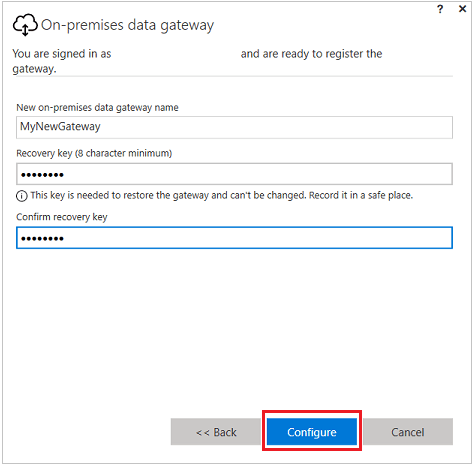
Open the software, and set it up. I chose to use my login credentials for this action. These credentials where also the ones that were “creators” in Dynamics.
Remember the Gateway Name and Password
When this is done you should find the Gateway in your PowerApps. NB!!! It will only install under the Default instance for now!!
Check connection with PowerApps
Last step is to open up your browser to PowerApps and see if we can retrieve the data. Open PowerApps
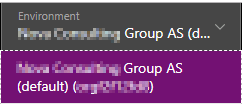
Make sure you navigate to the Dynamics Production environment
Then you open a new integration project
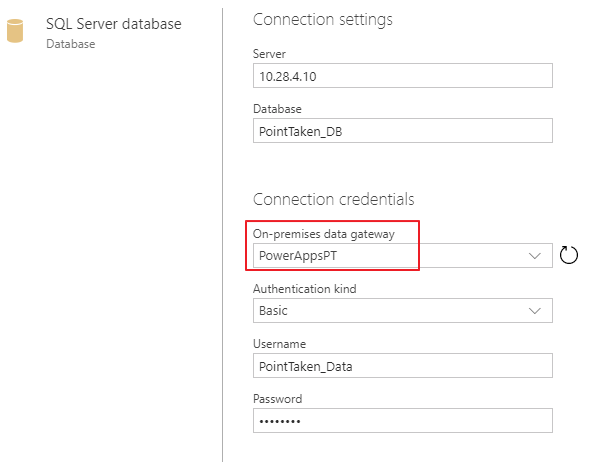
From here you connect to the On-Prem SQL DataGateway. Don’t worry, the credentials and IP are not real here:)
So the important thing on the next step is to use the credentials for your SQL server. These credentials only need to be read from a database. This means that you might have to ask someone to create read credentials for your database.
Choose the tables you want to sync. Debitor is Accounts in our ERP system.
If you are lucky, you will see the following result!! You are now one step closer to actually complete a NO-Code integration with an onprem SQL server.
Knut is a salesperson at Point Taken. He just came across a HUGE deal that he has registered in Dynamics 365. This deal is so big that Knut will need the assistance of several resources to deliver. One of these resources is Kjetil, a SharePoint consultant.
The setup
Knut enters the details needed for the Dynamics 365 deal
Knowing that this opportunity is HUGE, Knut starts by creating a new channel in the Offers Team (name is “General” for demo purposes).
The connection
Knut has now setup the structure for collaboration, and is ready to connect Teams and Dynamics 365 together. Well done KNUT!! 🙂
Add the Dynamics 365 connection for the tab in the channel
Knut chooses the correct opportunity record.
When Knut is done, he can see the newly created connection message in Teams. The above message indicates that Teams and Dynamics successfully connected.
The harmony begins
Kjetil begins right away with the PowerPoint they will need to win this deal. Kjetil does not have a license for Dynamics, so he creates the PowerPoint in Teams because this is the natural place for collaboration.
Knut can now choose to navigate Teams or Dynamcis 365, because the systems are working with the same document location.
Knut and Kjetil represent 2 different work processes, but are harmonizing well when referring to the ONE TRUTH document. Well done you to!!!
The configuration of the client is pretty straight forward. A typical office product, and that is a good thing:) FYI, it does not install a solution file within Dynamics, and I like that a lot… Never been a fan of the overcrowding of solution files (Hint hint portals.. hehe).
Start på opening the system settings from Dynamics and locating the “Enable Dynamics and Teams integration”.
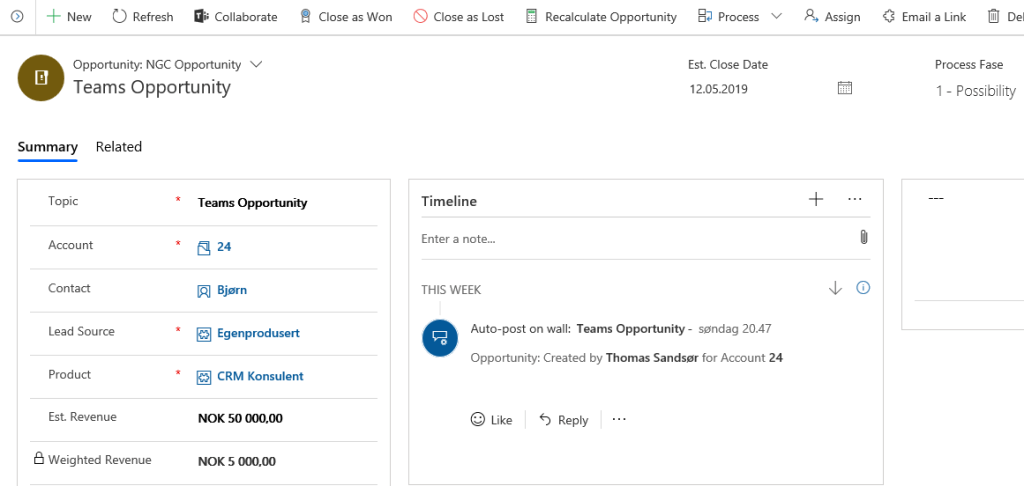
NB! Before starting, I would create a new Team and a new channel just for the sake of simplicity. Also create a new record in CRM that you want to connect to.
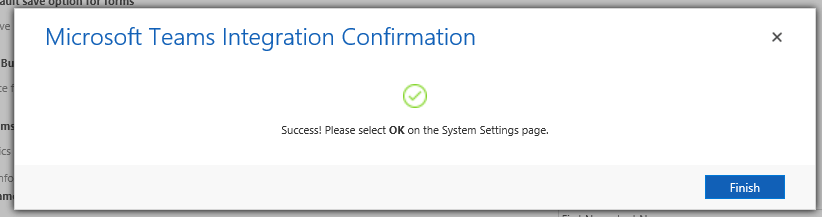
It took me about 3 minutes before I received my complete message, so be patient!
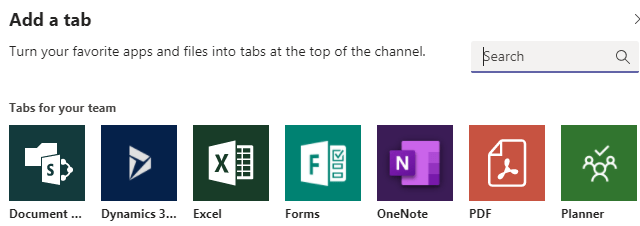
Open teams and locate the App Store within teams and search Dynamics. You will find it on the “…” menu on the left side.
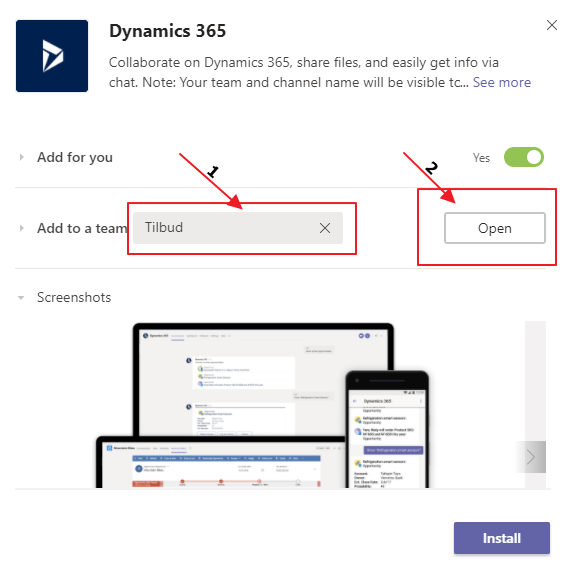
Add to the team you created. In my case “Tilbud” and then click Open
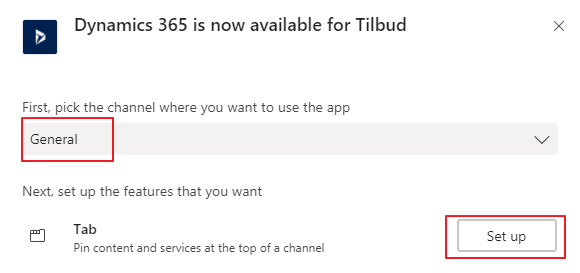
Next step is connecting it to the channel in the team, and hit “Set up”.
Now it will ask you for an entity to connect to, so I am going to choose the Opportunity I created before I started the configuration “Teams Opportunity”.
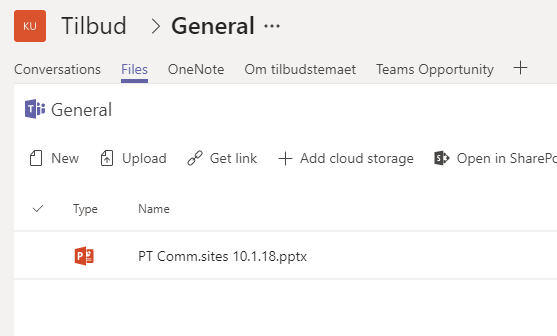
If it all went well, you will now see a new tab in your channel with the name of the record. You also see a message that the record is connected.
Microsoft has used words like “seamlessly” integrated when speaking about Dynamics 365 and SharePoint, and I have hated it since day one. CRM and SharePoint never seemed to get it right, and after a while I feel they just gave up. The current state of the integration is in most cases utterly useless.
Larger companies
The larger companies will require scalability and security. The integration has none of these in combination. The standard integration has absolutely no idea what security is, and therefore opens all documents for everyone with site access. In larger organizations they might want to separate the BU’s or even more granular access like team access in CRM. This is where you have to use 3rd party tools like Connecting Software. The second you start adding security to folders, you will hit the cap of 50k something unique permissions in a DocLib.
Result: Fail
Smaller companies
The smaller companies have the highest requirements in regards to simplicity. They expect it to be easy to drag/drop files, navigate a simple folder structure, merge documents from CRM that end up in the SP folder etc. In general the smaller companies are always benchmarking the CRM system against smaller collaboration solutions, and therefore expect simple usage. Again the standard isn’t enough.
Result: Fail
Microsoft Teams, the new hope
So with the introduction of Teams + Dynamics integration, we might be somewhat closer to a solution for collaboration that could work. For the first time it makes sense to include others outside of Dynamics 365 to collaborate on the documents. A salesperson could now easily work together with others in the organization that don’t have the Dynamics license. I will show you how in a later blogpost.
Does this mean that we can use the word “seamless” in regards to integration? NOPE, but we are one step closer. My biggest concern is still that the product teams working on this seem to be forgetting to solve the simple features. When you merge a document out of Dynamics, it should be easy to put it back in to Dynamics (SP folder) where it belongs! We should need to have solutions like Documents Core Pack or Xperido for the simple templates.
Anyway. Stay tuned for the next blog when I show how cool the new integration with Teams is:)

































 CRM Keeper