Something small, but yet useful. Thank you Tanguy for the tip🤗
As you probably figured out the Default Business unit name is something you can’t change OOTB after you have created a CRM/Dataverse environment.
If you are not careful when creating a new environment the org name will be set for you, and that is also when the Business Unit Name is set.

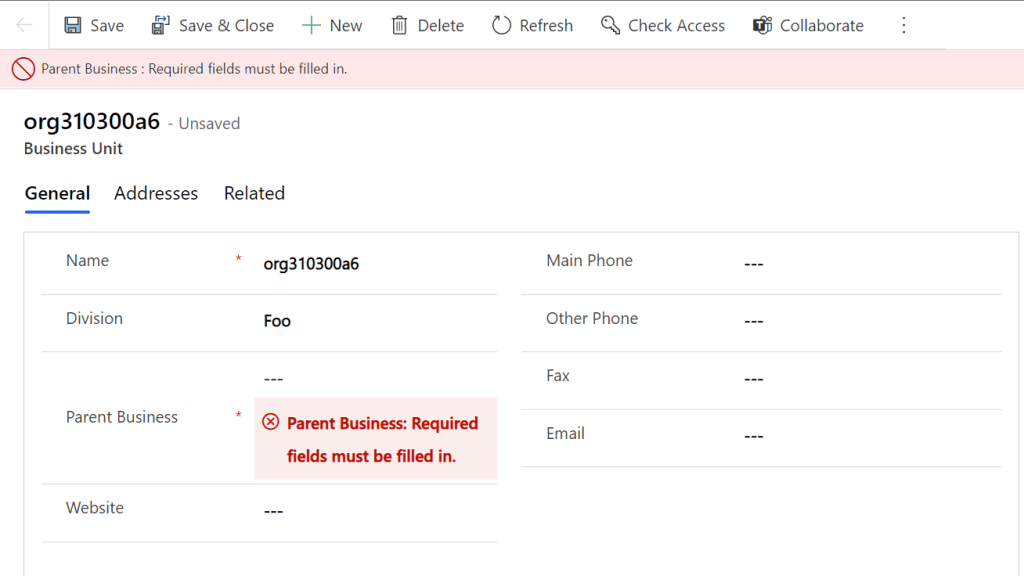
This can result in the following main Business Unit, and it just doesn’t make any sense. Also you can’t change it because Parent Business needs to be entered. Problem is that there is no parent to the parent in this case 🤣
XrmToolBox – Bulk Data Update to the rescue😎
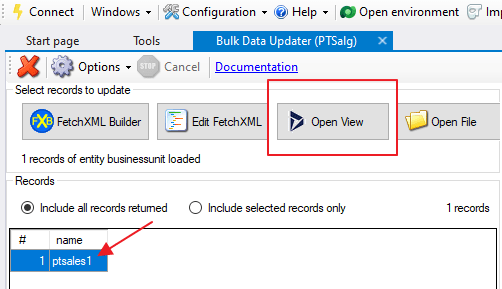
Open the view for active Business Units and find your result.
⛔NB!! Make sure your search only returns one business unit⛔

Next thing you do is set a fixed value, add attribute to the bulk job, and the update the record.
Discover more from CRM Keeper
Subscribe to get the latest posts sent to your email.

 CRM Keeper
Is there any other way to do this? I can’t figure out how to connect to Dataverse with the XrmToolBox.
LikeLike
There is a tool for edge/chrome called “level up” . This tool will allow God mode, and that will also make the change I belive.
But I would recommend to figure out XrmToolBox because it is so important for so much else
LikeLike