So this part 2 of the setup is not mandatory, but will help you change some preferences and look/feel of the integration. The settings area will also give you direct access to the chat bot, and I will explain more about that later.
Open the Dynamics 365 app in Teams
In settings you choose what environment you are showing, and the app. The App has to be UI app for it to show. Because this user might not need full access via Teams, maybe you should consider making a smaller app just for Teams.
The last setup you can do is connecting the BOT to your data.
Now it is possible for the chatbot to read and work with data in Dynamics.
The configuration of the client is pretty straight forward. A typical office product, and that is a good thing:) FYI, it does not install a solution file within Dynamics, and I like that a lot… Never been a fan of the overcrowding of solution files (Hint hint portals.. hehe).
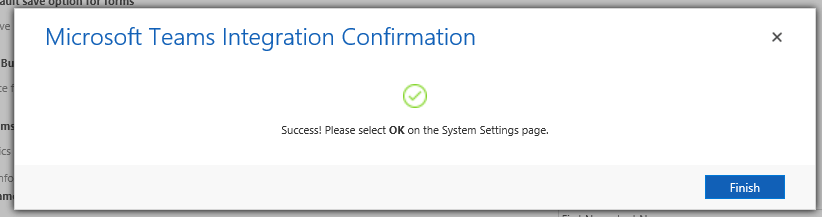
Start på opening the system settings from Dynamics and locating the “Enable Dynamics and Teams integration”.
NB! Before starting, I would create a new Team and a new channel just for the sake of simplicity. Also create a new record in CRM that you want to connect to.
It took me about 3 minutes before I received my complete message, so be patient!
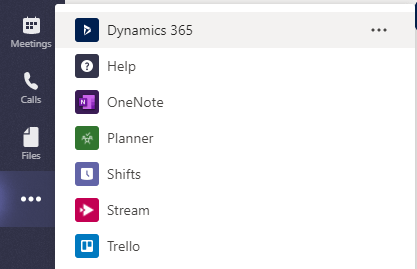
Open teams and locate the App Store within teams and search Dynamics. You will find it on the “…” menu on the left side.
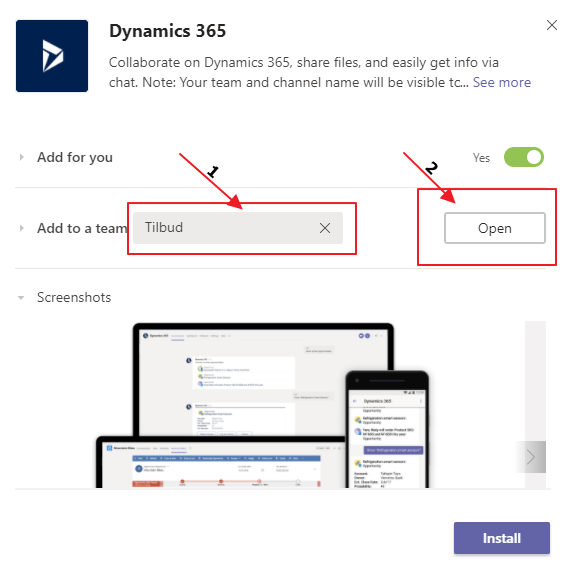
Add to the team you created. In my case “Tilbud” and then click Open
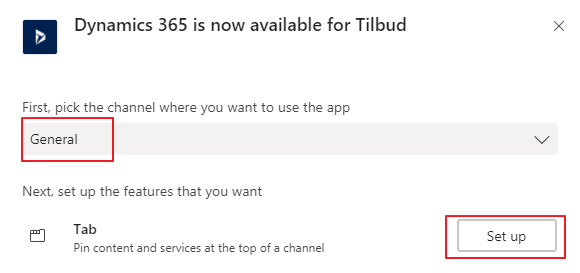
Next step is connecting it to the channel in the team, and hit “Set up”.
Now it will ask you for an entity to connect to, so I am going to choose the Opportunity I created before I started the configuration “Teams Opportunity”.
If it all went well, you will now see a new tab in your channel with the name of the record. You also see a message that the record is connected.
Microsoft has used words like “seamlessly” integrated when speaking about Dynamics 365 and SharePoint, and I have hated it since day one. CRM and SharePoint never seemed to get it right, and after a while I feel they just gave up. The current state of the integration is in most cases utterly useless.
Larger companies
The larger companies will require scalability and security. The integration has none of these in combination. The standard integration has absolutely no idea what security is, and therefore opens all documents for everyone with site access. In larger organizations they might want to separate the BU’s or even more granular access like team access in CRM. This is where you have to use 3rd party tools like Connecting Software. The second you start adding security to folders, you will hit the cap of 50k something unique permissions in a DocLib.
Result: Fail
Smaller companies
The smaller companies have the highest requirements in regards to simplicity. They expect it to be easy to drag/drop files, navigate a simple folder structure, merge documents from CRM that end up in the SP folder etc. In general the smaller companies are always benchmarking the CRM system against smaller collaboration solutions, and therefore expect simple usage. Again the standard isn’t enough.
Result: Fail
Microsoft Teams, the new hope
So with the introduction of Teams + Dynamics integration, we might be somewhat closer to a solution for collaboration that could work. For the first time it makes sense to include others outside of Dynamics 365 to collaborate on the documents. A salesperson could now easily work together with others in the organization that don’t have the Dynamics license. I will show you how in a later blogpost.
Does this mean that we can use the word “seamless” in regards to integration? NOPE, but we are one step closer. My biggest concern is still that the product teams working on this seem to be forgetting to solve the simple features. When you merge a document out of Dynamics, it should be easy to put it back in to Dynamics (SP folder) where it belongs! We should need to have solutions like Documents Core Pack or Xperido for the simple templates.
Anyway. Stay tuned for the next blog when I show how cool the new integration with Teams is:)
We all have different ways of demonstration the product, so I chose to create a video showing how I demonstrate in the simple sales presentations. I have only focused on the core essentials in sales during this demonstration.
There are several discussions regarding the use of CDS connector VS the Dynamics connector in the Power Platform. Recently I have been updating my knowledge a lot on PowerApps, PowerBI and Flow. The odd thing is that these environments behave quite different even thought they are so closely connected in regards to connectors.
how much longer will they co exist, and why are they even different?
So here are my thoughts about the current state April 2019 (this might be outdated in one month 😂)
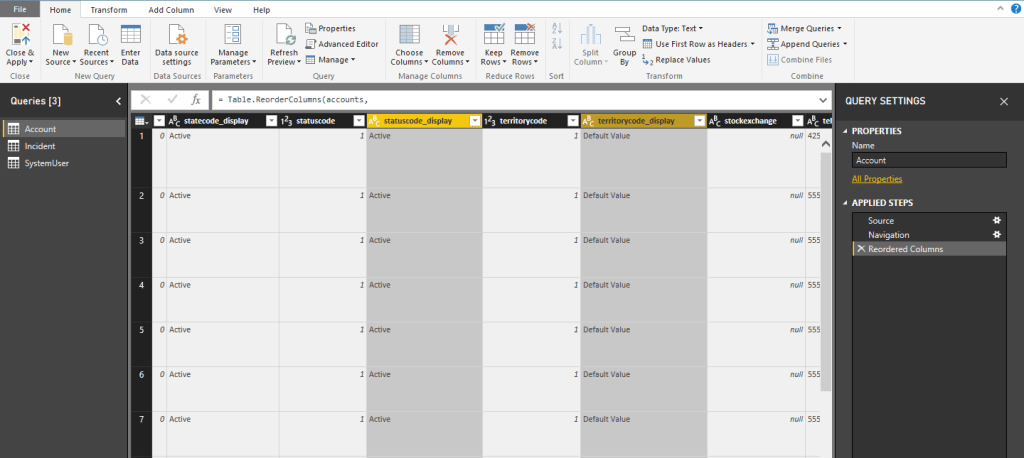
Look at the Yellow columns. They show the display name of the Options Set, so no more need for hacks to convert the fetch from numbers to names. Obviously a huge benefit that this solution will update when the Option Set values update also!
PowerApps CDS vs Dynamics 2 – 1
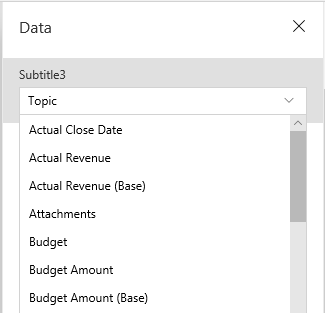
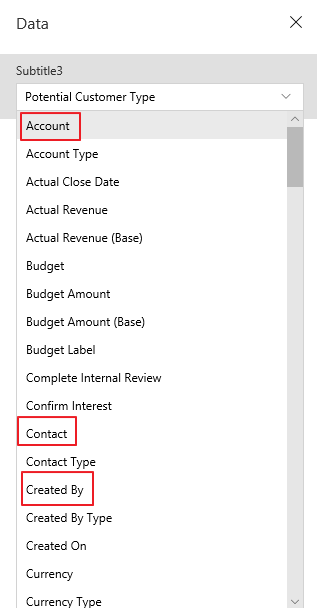
But wait… It might not be over yet. While tampering with lookup controls for PowerApps I found out that CDS simply doesn’t have the lookup fields in the data!
CDS connector (Simply doesn’t have any lookups):
Dynamics Connector (With lookups):
Data presented is still in a GUID state, but there is a workaround for that:)
There are several To-Do type programs out there, and everyone seems to have their own preference to what is the best tool to use. I will argue why To-Do is the best one for Microsoft users, and why Dynamics and To-Do now makes sense.
A video of To-Do if you are not familiar with the application:
I use To-Do as a tool in my every day work with Outlook and Dynamics. For this to work it is important that you have naming convention in place when working with Dynamics 365 and tasks.
Opportunity
On the opportunity I add a task that has a due date. I prefer to not use the use phone call, because tasks are pretty much the same thing. In my company we don’t have a CTI integration, and we don’t report on number of phone calls.
Outlook
I am using server side sync in D365, so during the next sync my task will appear in Outlook with a view over my tasks. That is fine and all, but if you are like me, the reminders in outlook is full of tasks and calendars. It is too hard to keep track.
To-Do
Now if you open To-Do, you will notice that it also has the list of tasks from CRM 🙂 Because there is no integration with Dynamics lookups, I use the names to remind me what the task was regarding.
When done, I close the task, and CRM is updated with a complete task.
To-Do is available as applications on all devices, and that is why I favor this application. They are continuously adding functions, to integrate it further with all Microsoft products. They are also working on integration with Planner so we can use one app for all tasks no matter where we are!!!
If it is one thing I have learned throughout the years, it has been to produce relevant demo data. Whatever you do, NEVER use data with the name “test”. The second a potential customer doesn’t relate to your presentation, they will loose focus.
Try to understand your customer before demo, and ask them to give some names of companies and products they sell. In the beginning your demo might only bee within a group of people that actually want your product, but eventually you might have to present to the people who hate change. It takes a little more time, but can be worth it in the long run.
A sample list you could as for in regards to sales demo could be: 1. List of 2-3 sales people 2. Short list of customers 3. Customers contacts (names only) 4. List of typical products/services they sell 5. A sample report of sales activity – Only if you have the time
It might sound stupid, but you have to remember that you are the person about to introduce change to the organization. Not many people are happy about change, and therefore you need to pay attention to the small details to keep their interrest.
1-4 are fair pieces of data that you easily can enter. Nr 5 is something I would do only if you had the time. A sales report might reveal a lot of fields/categories/processes they currently use. This can have a lot of value to include in your Oppty, but it might also take to much time to configure.
This blog is a part of a series of “Demo Sales – Simple Sales“, so I will only show simple examples. The demo I will be showing is based on sample data from MS.
Ryan is from Scotland, and I couldn’t stop thinking about Breavheart while he was presenting early Friday morning..
Jokes aside, Ryan delivered a great session in the world of a functional consultant. One problem we always have is that we want to solve plugin related issues, but we can’t code. That is why we have these WF tools that give us plugin like features. He is one of the first consultants I have meet that also loves the North52 tool.. hehe.
Great walkthrough of the tools:) remember to donate if they make your work easier 💵 pic.twitter.com/rC1L5DGmYO
— Thomas Sandsør | CRM Keeper 🇳🇴 | MVP (@CrmKeeper) March 29, 2019
Ryan showcased workflows from 6 different solutions. I think we all agreed after the session that we would gladly pay a lump sum to gather all of these awesome people in one room, and make one single tool 😉 Thnx to Ryan, and all of the people behind the free tools!!! Remember to donate if you use the tools.
Marco Amoedo, Wael Hamze – Dynamics 365 Quiz!
Dynamics 365 quiz, and time to shine. Time to show the world that I am the most awesome person within CRM!!
Well, it didn’t quite end like I expected. I was not even in the top 10 list.. haha. The level of knowledge out there is really high, and it makes me want to learn even more for the next time around. I am what you call a sore looser.
Resco – Doctors Without Borders case
Microsoft Norway challenged us to deliver a Pro Bono case to Doctors Without Borders (MSF). They do so much more than just send doctors to countries in crisis. One very important thing they do is survey companies around the world to find out what the standard incomes are pr country pr role. It is very important for companies like MSF not to overpay when they enter countries. By creating inflation, or overpaying doctors, you can end up stealing doctors from the local hospitals.
The combination of Resco + CDS + Power BI was a great fit here for storing and presenting data live. The event in Amsterdam gave us a great chance to work on the app with Resco to improve the look and feel.
When we are done with the case I will write about it in a blog article explaining why I chose the tech that I did etc.
Scott Durow – Power Platform Demystified
I think we all have more questions as things will change over the next months 🙂
Another Scott session packed with people. This session was about the Dynamics platform moving to the Power Plattform in a sense, and what it means in regards to function and licensing at the moment. I am not saying Dynamics is going away, but it is not NOT going away.. hehe.. It will be interesting to follow that the next year.
In the future we will be thinking more about apps than ever before, and that is actually a good thing. Apps will rule the plattform, and it might even make the integrations even better. The more we isolate the functions, the more “product” some of them can be. The more product they are the easier it is to standardize how to work with them.
Just look at our competitors. They are all products, and customers seem to understand that better than plattform stories. Let’s start with the product and then surprise them with the platform #easteregg 😉
Sarah Critchley – Panel discussion
Panel discussion led by Sarah was about AI, Dynamics and PowerPlatform. In the panel we had a good mixture of knowledge. Representation of knowledge here was quite interesting. The talks were about data consumption and data gathering. All sides open about what challenges they were experiencing with data quality in large organizations, and how mindsets of the employers were important to lead in the right direction.
The short story is that our implementations should be focused around actionable insights. As long as the end users se/understand the result of good data, they would feel more ownership to the data entry.
So I shouldn’t really write anything here because I am far to bias… hehe. Malin did a great job presenting a new product from Microsoft called Talent. Talent itself originates from Dynamics AX, but has been refurbished and made a lot better.
The main pieces here are Attract, Onboard and Core HR. each plays vital roles in onboarding new talents, and equally important, maintaining the ones you have. We all know how costly it is to lose a good employee, so why not put a little more effort into keeping the ones we have, and help them develop careers with set goals etc.
Malin has her own blog where you can read more about the product. Her idea is to create all content needed for you to pass the exam for Talent. Much like Neil Parkhurst.
I am just way proud of her as you probably understand 😉
Gus Gonzalez – Top 10 Free Tools for Functional Consultants
For those of you who don’t know Gus, get to know Gus. He works with podcasting, blogging and YouTube channel. He speaks to the technical level of Dynamics that I understand well, and therefore he is awesome;)
This session was about XrmToolBox
“If you are not using XrmToolBox, you are working to hard”.
Gus Gonzalez
I have seen Gus before during Microsoft Inspire and he had the same topic, but that was over 1 year ago. Many of the tools being shown were new to me, and if I only had seen the Attribute Manager earlier !! 😉
NEW tool about to go live is BPF editor. You can now bulk update a view of records to a given step in a PBF.
Megan Walker – Create a visual overview of your customers
Megan Walker session was about empowering Dynamics data within Power BI. The whole session was a live demo, really speaking well to the functional consultants. All of the examples were at a level where you feel that you can do it yourself. It is a must watch for consultants that need to “sexy” up their Power BI demo when presenting from a Dynamics perspective. Best of all is that every example was published on her blog!:)
BONUS: I got to interview Megan for my first ever Video/Podcast, and it will be out as soon as I learn how to edit sound and video..
Microsoft Roundtable
A big part of these Events is meet and greet with people, companies and of course Microsoft. We attended a round table discussion where Microsoft is opening how they want to increase our sales even more. Anyone working with Dynamics for a while has been a trained in Solution Selling, where you focus on pains that you can quantify. You then try to justify the project by fixing the pain, and therefore reducing the cost.
So Microsoft is working on a new industry specific framework for customers, so they can relate to the problems we can help them with. Once I get more information about this I will write more about the customer stories (given that the customer want’s to participate)..
Fredrik Sætre – Extending Power Apps to Power up Operations
Fredrik is a former MVP (now working for Microsoft). He represents the FinOps part of Dynamics, and therefore quite on the opposite side of what I normally listen to. Over the last few years I have heard him speak a few times, and he really is what I would call a Customer Engagement consultant on an FinOps world 😉
He is really enthusiastic about technology (not something I normally feel about the FinOps community), and great at delivering talks. It is interesting to see how FinOps is approaching the CDS story, and PowerApps. Every time I see him talk, there is something new in FinOps and PowerPlattform.
Even though I don’t understand it all, FinOps and logistics is really impressive. When you combine it with PowerPlattform that can surface data, it all makes sense to a CRM person like me:)
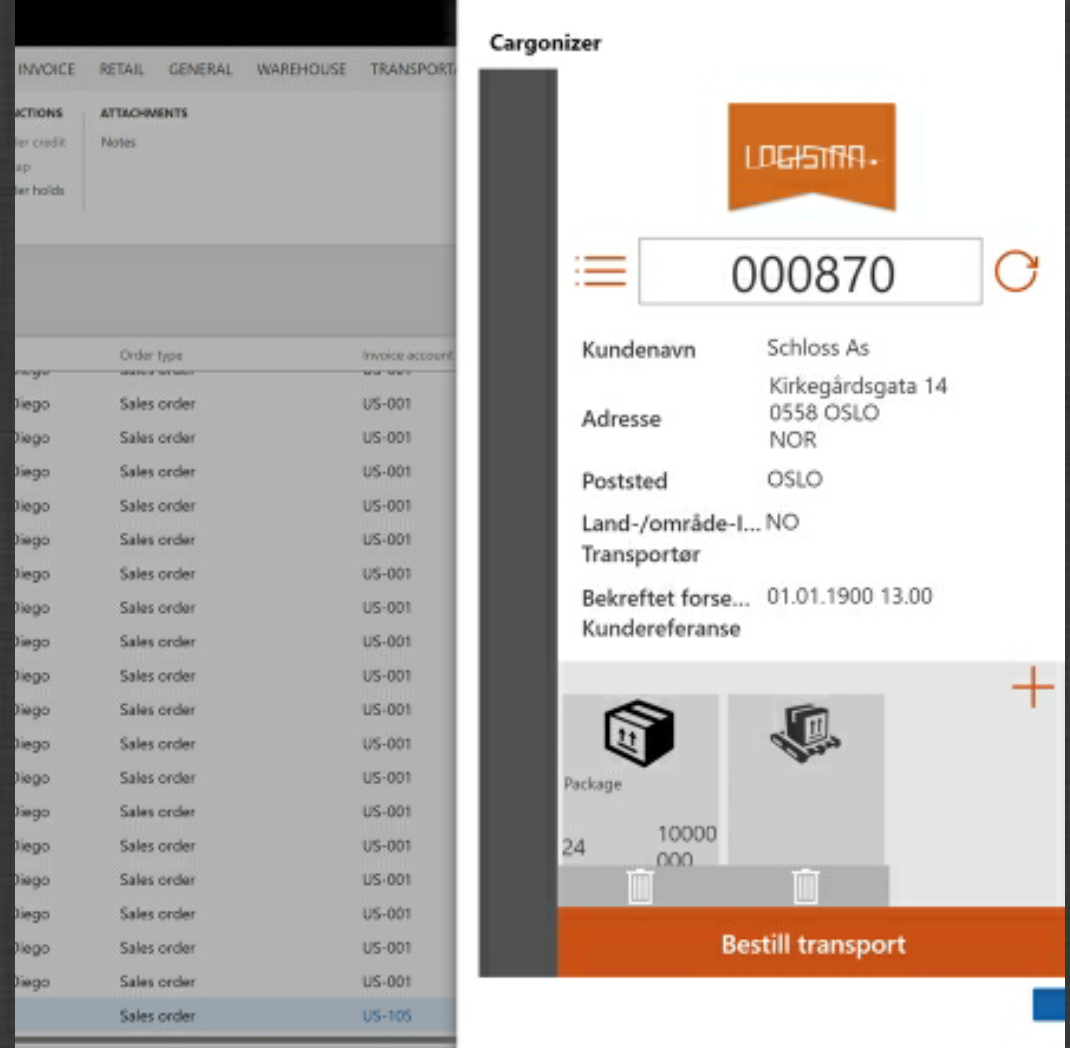
Below was an example from the presentation where he embedded a Canvas app in FinOps.
Keynotes are always a tough thing to evaluate. Often you see the CEO of a company or other higher management entering the stage to talk about all of the amazing things going on. Often the topics can be high level CEO to CEO content, leaving the room of “tekkies” left with nothing to be excited about. During the User Group I felt the combination of tech and CEO material was well balanced.
One thing that caught my eye during the keynote was the virtual assistant. I wrote a short article about it on my blog here: Café X being replaced by Virtual Assistant. A cool BOT framework integrated to the powerplatform via connectors. Certain elements requiring code before now can be solved with configuration (if you use CDS).
But the big
talk from Microsoft was of course AI and the power it gives us with the vast
amounts of data that we can collect and now understand better. The sales pitch
for AI is not really a problem, because everybody wants AI to work, but I am
not sure everyone understands what it takes for AI to make sense. What I am talking
about is the never ending “Chicken and the Egg”. You cant do AI without data,
and you might not motivate data without the AI.
It feals that the whole story with PowerApps and citizen developers is intended to lower the hurdle of collecting data, and therefore we can do more Actionable Insights once the data is in.
One version
So the story about ONE VERSION is actually really exciting. The world will during April all be on the same version of Dynamics online. It is just like SalesForce, and it enables us to commit on delivering updates at a regular pace. Commitment and promise from Microsoft is 2 major updates every year April and Oktober ish. This time around I actually believe that they are capable of delivering on this promise.
Customers will need to understand that software is an ongoing investment. What was a limitation 4 months ago, might be an opportunity now. Staying ahead of the competition will require you being current. The downside of a statement like that is that you will need more consultancy for upkeep of solutions, and you will have to look into the more experimental software approach. I guess this might scare some larger companies that still prefer to be slow movers.
Learning
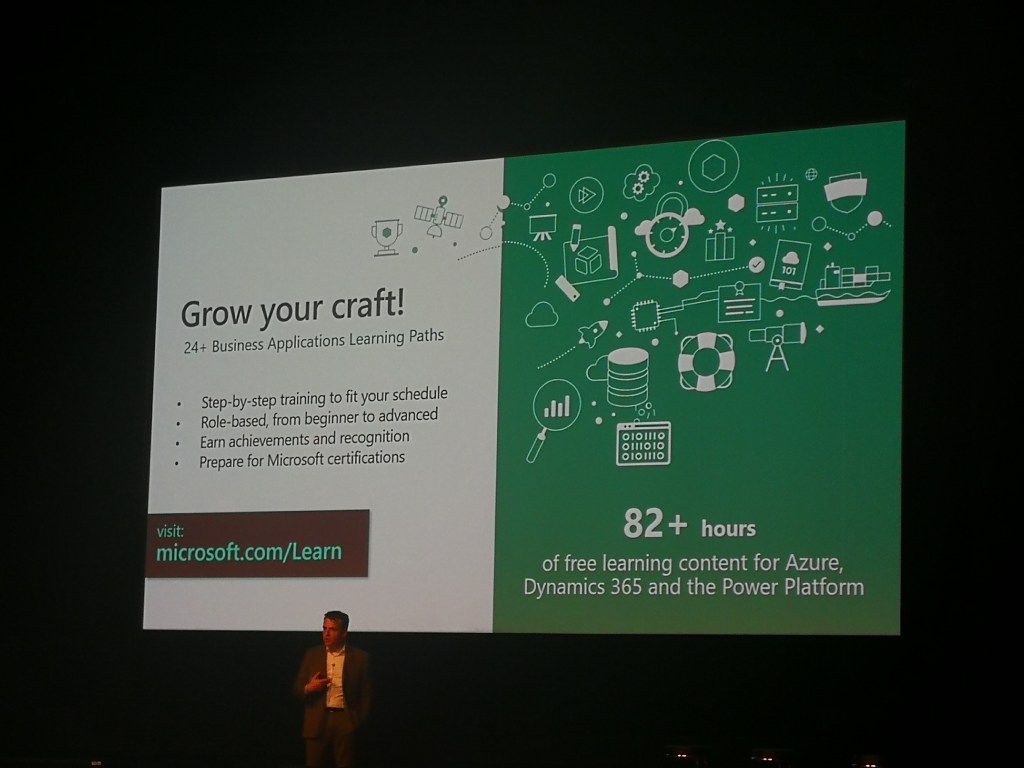
The story around learning and MS is fairly odd at the moment. While they are heavily investing in this great platform, the Dynamics content has also been released on the edx platform. Jukka has written a post about this. I see that this is copying the SalesForce model of brining all information out public to everyone, and I really think this is a solid move from Microsoft. About time some would say.
Neil Parkhurst – USA accelerator and Omni-Channel
Neil Parkhurst has released an accelerator you can download for USD. This will help you get started quick, and is a great tool to use when you wan to demonstrate the USD. USD is no simple product to demonstrate, because you have to understand the complexity of customer service organization for it to make sense. Link to Accelerator
He also informed more about the Omni-channel capabilities. I first thought this was a simple rebranding of USD, but from my understanding this will provide us with a framework capable of receiving information from several channels (chat, CTI, SMS etc) in a more controlled way than having to do heavy coding. More about the Omni-Channel.
Scott Durow – From javascript to Typescript
I attended this session hoping to understand more about Typescripting. I am a copy/paste scripter, meaning that I can’t really write my own code. Therefore I was a little uncertain that this would be right for me. It ended up being a little over my head:)
So I didn’t understand what was going on after some time, because the syntax for me was so odd coming from a JavaScipt CRM world. I guess it all just takes a little getting used to. I will start off by converting my scripts over to TypeScript in time when the projects are big enough. For the simple day to day scripting, I will stick to the small functions.
If you for some reason haven’t heard about https://kingswaysoft.com you might be doing migrations/integrations to complex. This session was first a theoretical part about the tool before we dove into some good examples of setting it up correctly. They have lots of good articles on the blog in regards to migration and capacity online, so head over there for the latest in updates.
One thing that was important to mention for Daniel was that the WebAPI was not considered as mature as the old SOAP. Therefore he still used SOAP for some integrations, BUT since this is being deprecated, you need to plan migrating the integrations over to the new API
Mark Smith – User Group from 0-3000 members
Mark Smith has an impressive track record behind him from New Zeeland, and has been an active part of building User Groups (amongst many other things). He was talking about his experiences going from nothing to something, and giving out tips on how to succeed.
One of the major “hmmm..” moments that caught me was how he got everyone together in the beginning to create a leadership that would drive this. In Norway I still feel that some partners feer each other a little to much to work on this goal. Eventually it would be awesome to see the customers own this User Group and continue pushing the market. It all sounds more legit when the customers are telling their stories:)
Neil Parkhurts & Lucy Muscat Microsoft Marketing vs ClickDimensions
I am not sure words can describe the tension in this room. Microsoft on the right side of the room, and ClickDimensions in the back. Neil and Lucy did an extraordinary job trying to express their experiences on the 2 products, while not offending any of the 2. If this were an octagon, I am not sure who won the fight. Both parties got a few solid blows in, but left the session as winners.
There is definitely a room in the market for both of them, but not in the same segments. I just wonder which one of them is going to figure it out first 😉
















 CRM Keeper