This is not a CRM post, but a post about being a consultant and problems that might occur. If you updated to the most recent version of Edge (September 2023) you might be jumping between profiles in Edge when entering different sites like: admin.powerplatform portal.azure make.powerapps ETC
There is actually a setting in EDGE where you can turn this off. Having way too many customer profiles, this is only a problem and I can’t have this on. Turning this setting off seemed to help the problem for a few of the admin pages that were jumping left and right 😂
Security Roles the least fun part about Power Platform – Dataverse / Dynamics 365. I would rather use hours finding the right ICON for every single custom entity😂. Yet security roles happen to be the pilar of why our platform is so much more powerful than other technical platforms.
I find that my approach to security roles almost always ends up the same way when I deliver new solutions. Therefore I thought I would share a bit of what goes through my mind in the different stages:)
1. Creating the role
There are many blogs about creating roles, and recently we even received a new modern way of modifying security roles. I’m not going to cover the hows, but you can pick up a few tips from the following blogs:
What I do want to share is my personal opinion on where to start. As you know I mostly work with Dynamics 365 and not pure Power Platform environments. If I am delivering a Sales solution I almost always start off by copying the Salesperson’s security role.
Don’t ever start a security role from scratch. It’s simply not worth the time.
So for Dynamics sales I would typically just copy the Salesperson as a start
And for Power Platform I might start with Basic User as a start.
A typical error I do is hoping that I can end up with a single security role to make things simple. Pushing all users into the same role because why not. I am one for more access to users, and depend on teaching people to handle data with respect. Within the first few weeks, you soon realize that you probably need an admin role for administrative tasks.
PS: One thing I always do is of course to limit any delete actions for ALL users the first few weeks so that they don’t blame the system for GHOST deleting items. Yes, that has happened! 🤷♂️
2. Assigning the role
After hours of banging your head on the wall, trying to figure out what security privileges you are missing for the application to work as expected, you arrive at the next task of assigning the security roles to the users.
The next error that I have done more than once is thinking that we can manage the security roles directly on the user. To begin with I use a tool like XrmToolBox to deploy roles to multiple users at the same time, but a few weeks/months down the line people hired/fired/re-org having to make these changes often is going to take way too much time. Having to bill for these changes is also going to be frowned upon because it’s “just a simple task”.
Traditionally this has been very straightforward for the sales and customer service users, but lately, this is becoming more and more of a challenge. With the release of new functions, you will soon understand that keeping up with security roles is almost impossible. With new solutions from Microsoft being installed automatically, you might also see a few security roles to follow along. Examples of this would be the Forecasting functionality to sales.
Normally one would think “Let’s just add these to the main security role for all users” BUT there are times when the actual security role ID/Name is the one opening up the functionality.
The Dynamics 365 app for Outlook User is one of these apps I believe. In order to actually qualify for the app deployment, you need this security role.
So my first initial thought that one user could have “Salesperson” as a single role with all of the functionality is now turning into a nightmare handling pr user. I now have to manage lots and lots of users/changes etc while trying to maintain the correct roles given. The image below is just an example
3. Structuring the security roles with teams
This leads us to the final phase of security roles for me, where I realize that I should have done things right from the beginning. Using the extra time early on so that I save time when the project is live😤
Just like marketing people are oddly obsessed with personas, we have to think about what types of users do we expect to see in Dynamics / Power Platform. In a simple solution, you could easily have the following personas.
Sales User
Sales Admin
Marketing user
Dynamics users are well aware of teams being able to connect security roles, but Power Platform users are not always aware of this.
Create a team, add users, and then add the security roles. This is a much simpler way of managing changes in security roles because changes only need to happen in 1 place.
⛔Hold up⛔
The problem with this solution is that Dynamics / Power Platform consultant or someone familiar with Dynamics / Power Platform needs to make these changes. In a worst-case scenario, a company would have IT create a user and assign a license. THEN they would have to contact other consultants to add security roles or add someone to the team for correct access. This method is flawed and will at some time become a problem. Microsoft has fortunately given us a great solution for this.
✅Solution✅ – AAD Security Groups / Entra Identity Security Group
I am not going to cover how to create a security group in AD and later on, add it to Dynamics / Dataverse. Have a look at the following posts for these tasks:
What I think is so important about the Security Group is that it removes the burden of access from the Dynamics / Power Platform consultant, and puts it in the hands of IT managing general access to all systems in AD. This just makes so much more sense, because these people normally do the on/off-boarding for all technical aspects. All you have to worry about is that security roles are given to the correct team.
Within Dynamics / Dataverse there is no difference in how to assign security roles BUT there is a major difference in having the members auto-populated based on AD security groups.
Moral of the story
Use Security Groups unless you have a very good reason not to 😘
In the era of Low Code why on earth am I suddenly an advocate for the Pro Code scene? Well… There are changes coming that should make you think before putting all your eggs in one basket.
Did you by any chance get to read the recent blog from Alex Shlega ? <- read here! Alex talks about upcoming changes/limits to Power Platform. At first I thought this was an issue not related to API limits, but it turns out it’s closely related. This time the limits are “ALL UP” within the platform and are defined as Power Platform Requests (IF I have understood this correctly). The change in total number of Request “included” is actually insane, if the numbers from his blog post are correct.
What on earth is a Power Platform Request?
Glad you asked! My understanding as of now in a flow are all elements included in a flow.
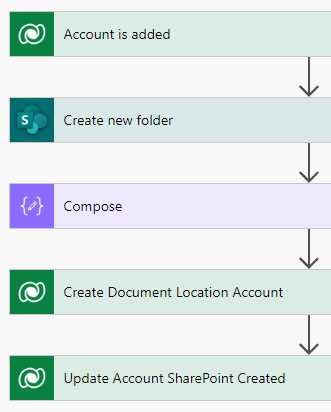
This flow includes 1 trigger and 4 actions. That would be 5 request. They are even counting the compose action if I understand Alex correctly. Why would this matter you say? Well, when the changes are so drastic you definitely have a look into the Flow’s you have in your current environments.
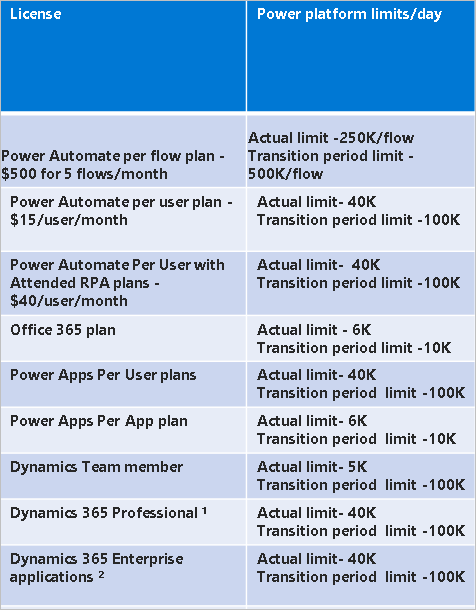
Every normal user is given a 40k limit pr 24 hours based on the listing that I copied from Alex:
Oddly enough Dynamics Enterprise is getting the same as Power Platform pr user and Professional (would expect more🤔).
Why I have become more pro code?
To my understanding ATM this does not apply to Plugins or Actions (the good old legacy code we can create in Dynamics / Dataverse. Until this above will be enforced, you should take the time to look through all types of Flow’s and consider if this is code worthy or not. In reality, anything heavy should not be in Power Automate (personal opinion).
So maybe this is the time to level up your programming skills once and for all, and make sure that you are able to write plugins/custom actions! People are getting bored at me saying this, but since you “embraced” Power Fx, you also accepted that you now do code. Might as well do some real code while you are at it 😘
PS: Did you get the update about the Low Code Plugin? I still don’t know how this technically works behind the scenes, but I do believe it uses pure code for the Dataverse directly stuff, and would only consume a Power Platform Request once you start using it with connectors and such. Not really sure to be honest, but it will be interesting to see the development here.
Where do I begin with programming?
Might sound a bit cliché, but ChatGPT is actually a good start together with a few blogs. Within Dataverse direct programming (platform code) it’s easier to find relevant samples to work with. I will also make a course on YouTube after summer that will explain how you can get started with BASIC BASIC plugin development.
For those of you that follow me on twitter and other media, I recently posted out a few questions to trigger some conversation about code. Specifically it was JavaScript code for a functional consultant. The feedback was extremely varied, and that was my hope. I of course have an opinion on the matter, but didn’t want to voice it before I heard what people in general feel about the subject.
This is only from my twitter, but had a similar thing on the Dynamics group of Facebook. There are not a lot of votes here, but in general it’s fair to conclude that most don’t agree with me in regards to Dynamics 365 JavaScript.
I personally think that functional consultants need to know BASIC JavasScript for Model Driven Apps. Examples of basic to me is the Hide/Show with potentially a few calculations. The obvious reason for this is the user expecting to se changes in the app visually while they are entering data. Having things calculated asynchronous is just not good enough when working in a Model Driven App.
But JavaScript doesn’t run server side. You cant use that!
Someone
True, but sometimes the code doesn’t need to be server side, because we can guarantee that the usage is being done within the app. Other times integrations might directly update data and the scenario might be different. The point I am trying to make, is that you should be able to choose the technology because you know how to do it. Not choose the tech based on what your limitations are. There are way to many implementations that are absolutely chaos taking over because of Business Rules, Calculated Fields or Formula Column bombardment.
But I’m not a developer??!?🤷♀️
Well.. Is that really true? I hope you don’t mind me quoting you Steve, but I 100% agree with you on Code is Code. I know you are referring to the idea that this should be done by dev’s, but what would life be if we all agreed on everything? hehe.
I see tons of functional consultants accepting that PowerFX in Canvas Apps is just “Excel formula”. Looking at the example below of an update statement….. How is this not ProCode?
How is this any easier than JavaScript if you just look at syntax for a hide/show?
I understand that these are to absolutely different functions, but the whole idea of accepting PowerFX as a Low-Code language should mean that you also accept JavaScript to be a Low-Code language.
These to languages are so extremely different in logic. My mind is made up of sequences of actions, and that’s why JavaScript makes sense, while PowerFX in Canvas is the result of whatever happened in a prior action(and that fries my brain sometimes).
But JavaScript it’s to hard to learn!
Nothing is harder than learn to do Canvas Apps correctly. I have been doing it on and off for years already, and I still feel like I am a terrible app developer in Canvas. You all know I am from the Dynamics background and wish most things would be in the context of a Model Driven App. I accept that I am not a creative person, and that a button is a good button as long as it works (not because of rounded corners😂).
JavaScript is just something that you have to do a few times in a test environment and you will quickly see that it’s a lot simpler than you actually thought. Most of the stuff being done in JavaScript these days is hide/show’s and simple calculations. The heavy JavaScript’s that we used to see have in many cases been replaced with other tech (Custom Pages, PCF Components etc).
Later this year I will try to release a YouTube course “JavaScript 4 Dummies, by a Dummie”. It will be my take on simple JavaScript, and I will make sure that everyone will understand the basic principles of HowTo JavaScript.
🙃BUT UNTILL THEN🙃 I am actually going to record a series on “Plugin’s for Dummies, by a Dummie”. Wonder if people will accept a Plugin as Low-Code?!???! haha.. Don’t worry.. It’s Pro-Code, but it’s not impossible now that we have GPT to help us out with syntax! More info to come👏❤
This might be the dumbest blog in a while, but I am adding it in case others have problems with the same issue.
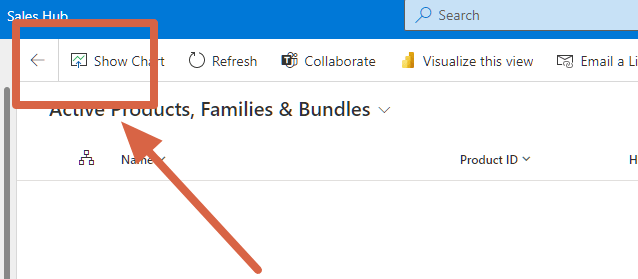
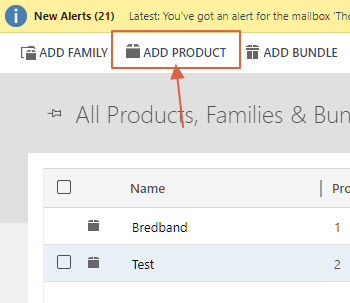
Recently I needed to add new products to the product table of Dynamics, and the buttons for adding the products/families were gone.
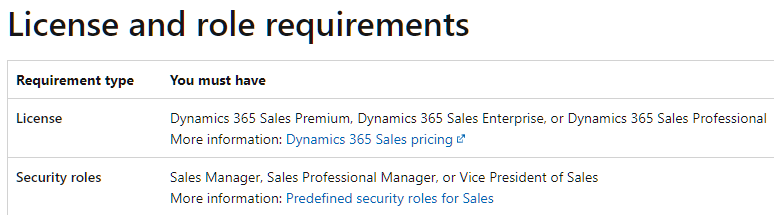
I of course had to look at the documentation in case there was something obvious I was missing. The documentation only wanted to ensure that I had a license + security role.
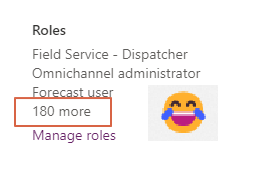
All of this was checking out on my side as I had a license and I was an administrator. Still, I was desperate trying to understand such a stupid issue that I made sure I had enough roles:
Eventually, I got some help from friends, and a huge thank you to Vivian Voss for pointing me in the right direction. First I was told to check the “obvious”.
Are you able to configure products via the old UI?
Vivian Voss
Well, turns out I was.
Solution?
Go to the Default Solution of configuration and make sure that “read only” was not on for the product table in the new UI😂😂🤷♂️🤷♀️🤷
The only thing that I can think of is an update from Microsoft changing this value for some odd reason. The fact that it is read-only in the Unified Client makes no sense, but hey. Not the first time something like that has happened.. hehe.
Just make sure this is OFF, Save changes, and then publish the table. You should be able to configure products again.
Did you recently see the update from Power CAT announcing the 3 dev environments pr user?!?! The topic of more than one dev environment has been discussed in several forums over the last years, but finally, it is here. Go check out the video on YouTube about the details:
In short a few key takeaways:
3 Dev environments PR user
2 GB of data pr environment (does not count against storage)
Premium Connectors included for testing
ALM setup for getting to know solution management better
Automatic cleanup of environments over time (if inactive).
Or should I say https://make.preview.powerapps.com <- for now:) Depending on when it will be released to everyone, the ability to add environments from make.powerapps portal is not yet rolled out. Go to the PREVIEW make, and you should be able to see it there. This is important for users without access to the admin.powerplatform.com.
Go ahead and try it out and see where the limitations are. The important part here is to learn new things by trying them out. Enjoy!
In just a few days Arctic Cloud Developer Challenge is going to kick off at Soria Moria hotel in Norway. This is a hackathon that gathers the best of the best within Dynamics / Power Platform / Azure / .NET / M365 etc.
The main reason why I haven’t been so active blogging lately about CRM is that this has been my main focus! I am really excited and proud to be a part of the ACDC team💪💯
We have specific themes every year, and this year it’s Pirates
Teams of 3-5 battle for points and glory to win the prestigious ANTLERS
We will be more than 50 people over 3 days gathered at Soria Moria hotel in the wonderful arctic mountains of Oslo. A brilliant team of 5 judges will determine who is victorious.
By now I am sure most of you have heard about ChatGPT. The AI product is pouring out surprisingly intelligent responses to all sorts of questions that people all around the world have given it lately.
There have been examples of the tool writing papers for school, creating blog posts for people, and helping formulate fairly complex text for webpages and marketers. One thing that someone tipped me off about was the ability to write code, and I was a bit curious as to what that would mean.
So one of the many gaps in my knowledge is specifically regarding Plugins. A plugin is a piece of backend code that runs in real time when triggers occur in Dataverse. I tried doing a little plugin with some help a few years ago and wrote about it on the Company Blog – Plugin in 1 hour.
I was curious how ChatGPT would do with a similar issue, so I took it for a spin😊
Question
First off I started out with a question that you write the same way you would anything Google/Yahoo/AltaVista/Bing/AskJeeves/DuckDuckGo/etc etc etc
The response I get is fairly spot on. Certainly, some will comment about something not being 100% accurate here, but this is more than good enough and quite well-written!
This wasn’t exactly what I was hoping for, so I asked a follow-up question to my original question.
It thought for a few moments before it started spitting out CODE!! 🤯🤯🤯🤯 (above is just a snip of the total code. I put it all in a code box below).
using Microsoft.Xrm.Sdk;
using Microsoft.Xrm.Sdk.Query;
using System;
using System.Linq;

namespace MyPlugins
{
    public class SumProductValues : IPlugin
    {
        public void Execute(IServiceProvider serviceProvider)
        {
            // Obtain the execution context from the service provider.
            IPluginExecutionContext context = (IPluginExecutionContext)serviceProvider.GetService(typeof(IPluginExecutionContext));

            // Obtain the organization service reference which you will need for CRUD operations.
            IOrganizationServiceFactory serviceFactory = (IOrganizationServiceFactory)serviceProvider.GetService(typeof(IOrganizationServiceFactory));
            IOrganizationService service = serviceFactory.CreateOrganizationService(context.UserId);

            // Retrieve the Opportunity record that the plugin is running against.
            Entity opportunity = (Entity)context.InputParameters["Target"];

            // Create a query to retrieve the related products.
            QueryExpression query = new QueryExpression
            {
                EntityName = "product",
                ColumnSet = new ColumnSet("productid", "price"),
                Criteria = new FilterExpression
                {
                    Conditions =
                    {
                        new ConditionExpression
                        {
                            AttributeName = "parent_opportunity_id",
                            Operator = ConditionOperator.Equal,
                            Values = { opportunity.Id }
                        }
                    }
                }
            };

            // Retrieve the related products.
            EntityCollection products = service.RetrieveMultiple(query);

            // Sum up the value of the products.
            decimal totalPrice = products.Entities.Sum(product => product.GetAttributeValue<Money>("price").Value);

            // Update the Total Price field of the Opportunity record.
            opportunity["totalprice"] = new Money(totalPrice);
            service.Update(opportunity);
        }
    }
}
🤯🤯🤯🤯
At this point, I was extremely excited to see that the result is pretty darn good. Sure the trigger here is based on Opportunity, and not the opportunity product, but that is beside the point. It seems that I could have formulated my question in a way that I would have understood it correctly. This is actual usable code for a plugin that could run on Opportunity level to update the sum of all Opportunity products.
Not really sure what more to write about this ATM.. Still trying to wrap my head around it all for now.
Initially, I was just going to explore some possibilities with Custom Pages, but decided to make a solution out of it instead. This way you can just download the solution and do the required modifications for your project (GIPHY API key), and you are good to go😁
I am really excited to hear your feedback after seeing/trying this out, and hopefully, I will be able to make it a lot better in next revisions of the Custom Page!
Go to my GitHub to get a hold of the solution. It’s a pretty “thin” solution that should be easy to configure and easy to delete if you no longer need it.
I have also included a video displaying how you install and use the solution
Installation and setup
Because of ribbon changes, I was forced to create a managed solution for this. The only way it wouldn’t overwrite the current opportunity ribbon.
If you want to play around with the solution, download the unmanaged. Just make sure you don’t have any other ribbon customizations on Opportunity. If you do back it up first!!
For everyone else, you have to download the managed solution to be on the safe side.
On my Gihub page I have written what components get installed, so you can easily remove it all at a later point in time.
Did you think my last post was the final stage of the “Custom Page – Win Notification“? Of course not!! We have one more important step to complete the whole solution.
I am all about salespeople being able to boast about their sales. If you meet a salesperson who doesn’t love to brag about closing, are they even in sales? 😉
Communication is key when you work in organizations of any size and location Onprem/Online/Hybrid. Doesn’t matter where you work, we can all agree that spreading the word around, and making sure everyone gets the latest news is hard. Microsoft is making it pretty obvious that Teams is a preferred channel, so that’s where I also wanted to focus my energy.
Notify the team
I decided to extend the solution a bit to reuse the GIF that we got from the last closing screen, and include it in the Teams integration that I wrote about earlier in the Adaptive Cards.
The first thing I did was to add a new group of fields for the Teams notification. I wanted to let the user choose if they wanted to post the sales to Teams or not. The obvious reason is that some opportunities might have to be reopened, and you don’t want the credit 2 times etc. It’s just a simple logo, text and boolean field.
The next step is adding the variable BoolPostTeams to the run statement of the Power Automate when I click “Confirm Win”.
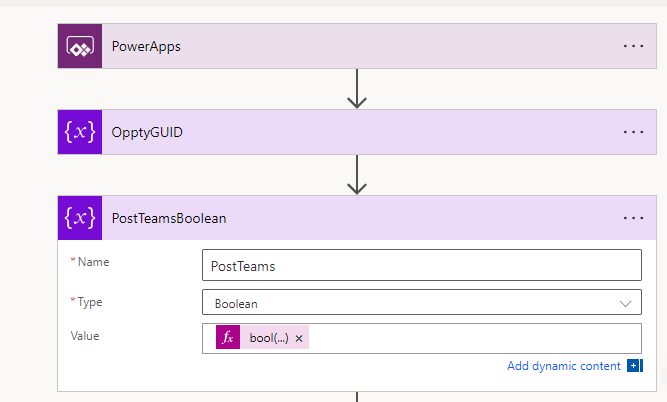
On the Flow side of things, I will now receive 1 more variable that I can handle. Because I wanted to use the bool type, I have to convert the string “true/false” to a boolean
bool(triggerBody()['Initializevariable2_Value'])
What team are we updating?
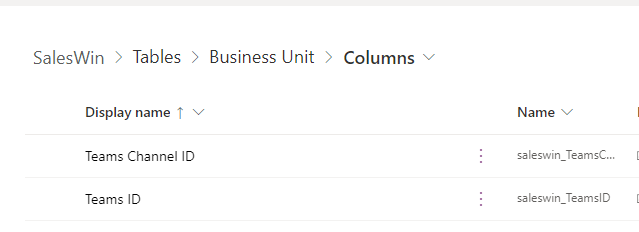
Glad you asked 😉 A part of the solution is to include a Team ID and Channel ID. I added these fields to the Business Unit Table. When we store the Teams/Channel ID’s at this level, we can reuse the same solution for several teams in an organization without having to hard code anything.
These are simple text fields that will hold the unique values to the Team and the Channel you want to notify.
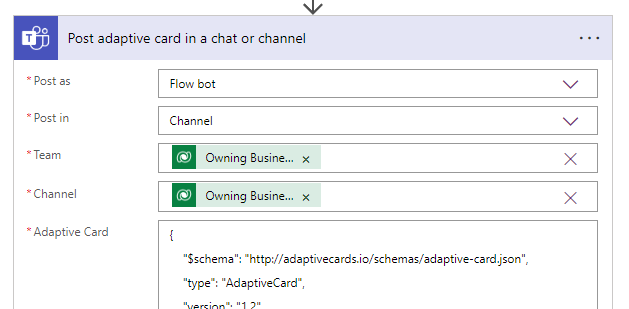
NB! A tip for getting the Teams ID and the Channel ID: Add the Team and Channel via the drop-down selector (flow step below). Then open the “peek code” to see what the ID’s of the teams are. If you don’t understand this step, just have a look at my video in the final post of the series 🎥
Back to the flow!
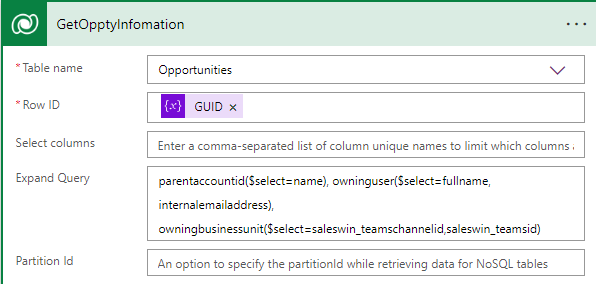
We update the get Opportunity with extra linked tables. This way we don’t have to do multiple retrieves, and only get the fields we need from the linked tables.
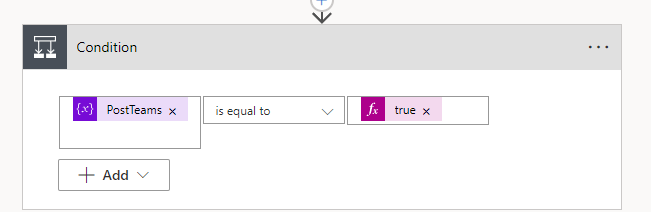
After we update the opportunity as closed with our Custom Action “close opportunity”, we check if the close dialog wanted to notify the team.
‘
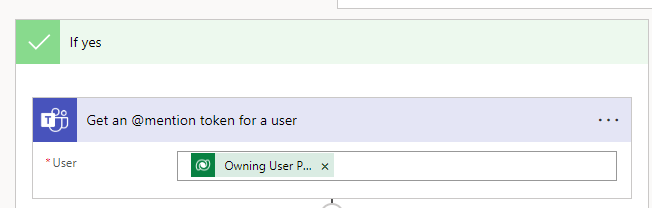
Then we need to get the @mention tag for the given user that made the sales. Here I am using the email address from the SystemUser table we are getting from the Opportunity extended table.
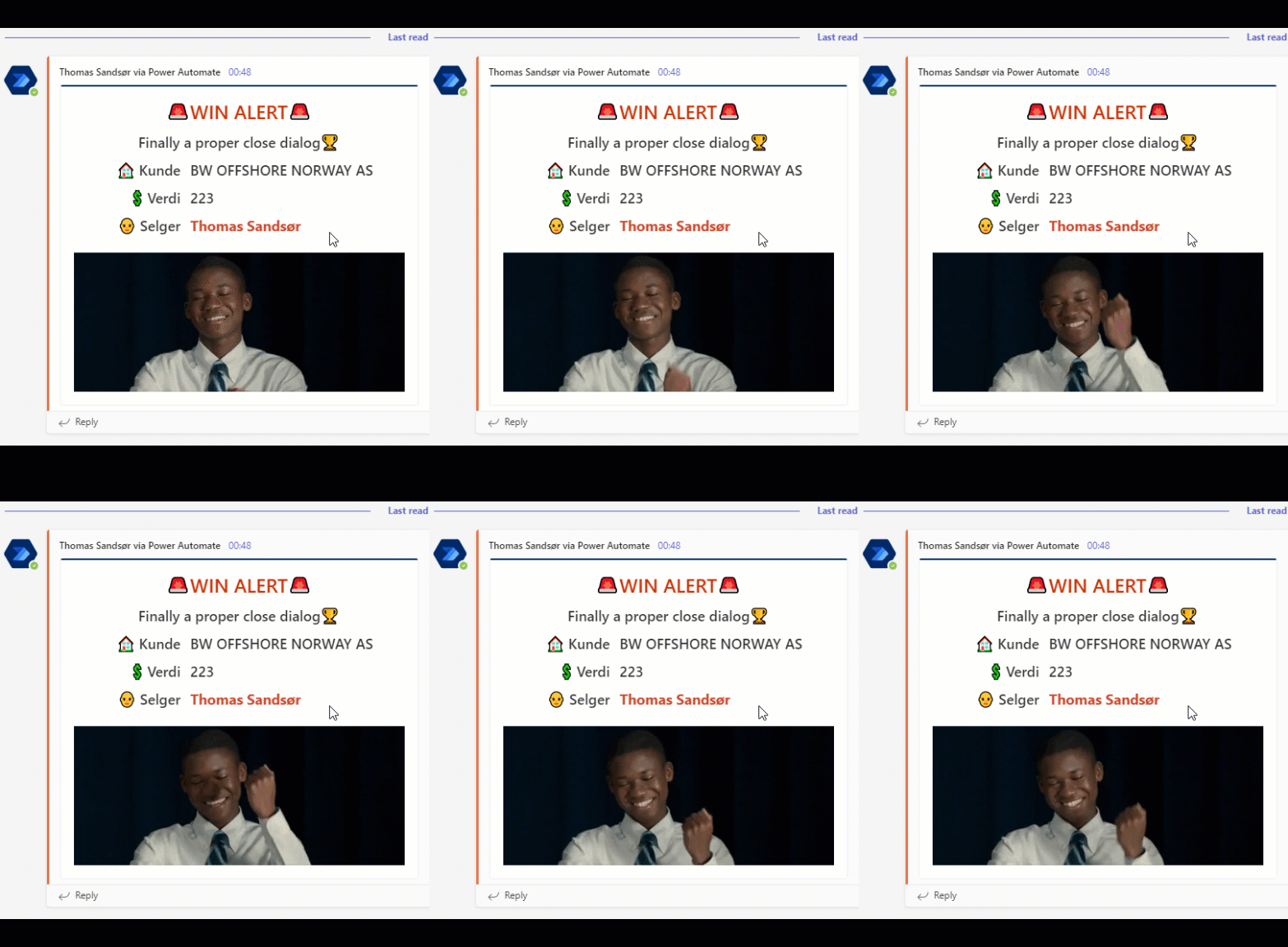
Finally, we post the Adaptive Card to Teams and behold the wonder of the adaptive card!! 💘












 CRM Keeper