I know the title be a little misleading. PowerApps doesn’t support CSS as of now (maybe sometime in future), but you can create a CSS light for simple tings while we await the custom Themes for PowerApps.
I find it extremely annoying when creating a large app and you need to customize visuals. If you make a change to one “screen” you have to make the same change over and over again.
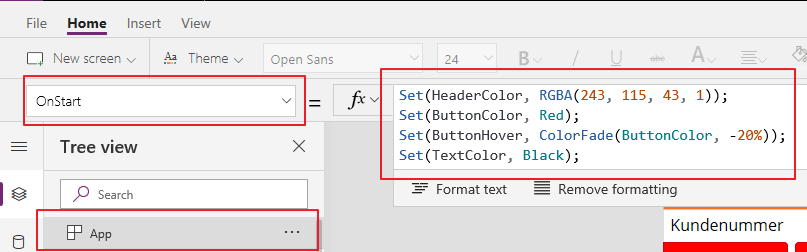
In this example I declared a few variables in the beginning of the PowerApp, and one of these is the button color “RED”.
As you can see, my button color will be read when I choose to give them this color.
So at some point I decide that I want the color to be the same as my heading, and all I have to change is the color code in the app “onload”.
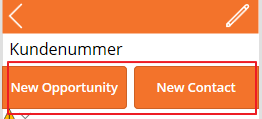
The result is matching buttons without having to manually change each color setting!:)
NB! after changes in the “onload”, you have to refresh the browser to see the effect.
One confusing obstacle with a new CRM system, is the connection between Dynamics CRM and SharePoint. As a consultant I often have to demonstrate what is really happening behind the scenes to justify why this isn’t straight forward. We have to tell the customer about different folders, different entities etc, while they simply don’t care. They just want it to work together.
One particularly interesting point is when they move between entities. Why can you work with documents in the Lead, and when you navigate over to Opportunity, you no longer see your sales documents? Technically I understand why, but from a functional perspective I understand the customer.
Recently I ran into this scenario when implementing Field Service. Sales produced documents what were important throughout the whole cycle Sales -> WorkOrder -> Assett. Navigating between the entities takes to long, so the challenged me to find a solution.
FLOW TO THE RESCUE ❤
When the opportunity was done, we needed to create 1 or more WO in Field Service. Important factor was to maintain all the work done in Opportunity with the documents, so the Field Service Technicians could see everything in one entity (WO).
Challenge: When I create a new Work Order from Opportunity, I need to copy the document location from the originating Opportunity.
Flow begins with a simple trigger. When a WO is created.
Then I check to see if the related Opportunity contains data. This is just to make sure that the WO actually is created from a Opportunity.
Then I needed to get the document location regarding the Opportunity. As you can see here I am only returning 1. There won’t be any more document locations on Opportunity the way they are using it now. If you wonder how to filter, check my other post LIST CDS RECORDS IN FLOW
This is where I create a new Document location, and set the Work Order as regarding. Flow will automatically add “FOR EACH” to loop through. In my case it doesn’t matter, because I only have 1 document location from Opportunity.
What the user sees
This is a new Opportuinty
The opportunity has documents related to it.
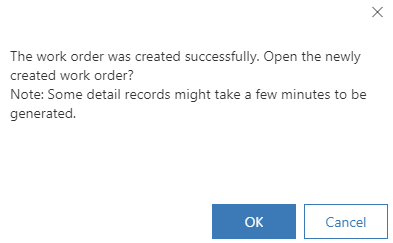
I then convert the opportunity to Work Order via the button in ribbon. I get a message when this is complete.
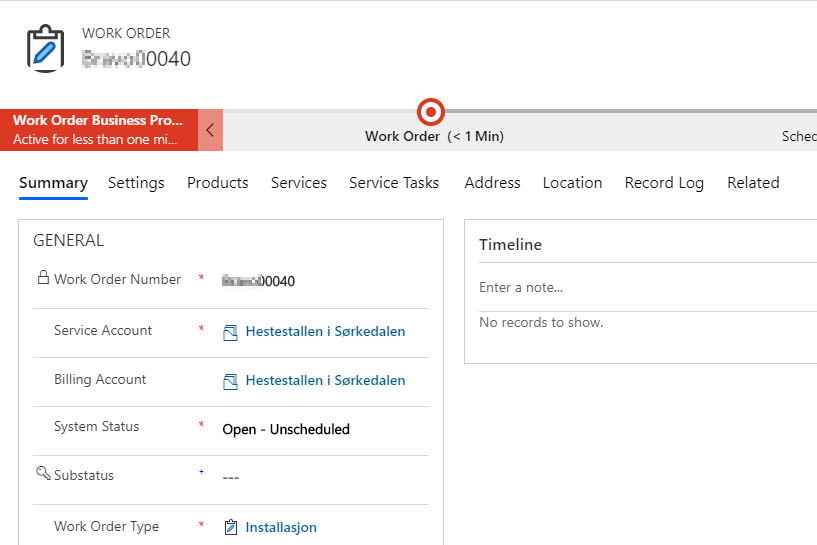
I open the document location of Work Order, and VIOLA, the same documents.
Personally I love finding quick wins like this that mean a lot for simplicity. Any CRM application will be complex for the end user, so these parts help:)
Power Platform is maturing rapidly, and users are really loving the new platform for citizen development. The only natural thing to do for Microsoft was to alter the licensing model now that they see how users are working with the platform.
Normally I am the first one to hate on all changes, but this time I am not sure I hate it. I am actually seeing some opportunities here that I didn’t see before.
I am seeing this from a Dynamics perspective, and not Office. There are 2 different ways of viewing this change.
From what I read, we can now setup a 10$ pr user pr month and create a sales app with both Model Driven and Canvas AND Portal. Within the app we are also capable to run as many flows as we want without the need for a FLOW plan.
You might still need one Enterprise or Proessional license in the bottom for the entities to be installed on the CDS, but after that you can create your own simple apps.
NB! I am sure that Microsoft will introduce some other restrictions later on to separate the apps (Sales, Customer Service etc), but currently this is not the case.
Ohhhh how I miss the Composite fields in dynamics<3
It was introduced in 2013, but was never given much love. It was one of those changes the customers loved, but always wanted to configure. This resulted in many strange javascripts that I personally refused to use. Now that the new UI is being forced upon us, the field will disappear it seems, and that is too bad. The new UI is fine, but it is not as efficient with screen space yet, fields like this actually make a lot of sense.
Julian Sharp was recently in Norway to teach the App in A Day. I was one of the lucky few that got a spot in his class. Sure I have been in Dynamics since 2007 and should know it all, but that is the only once certainty. I will never know it all, and there is always something to learn from a person that has a different perspective on things.
Thank you Julian for the great class, and the advice during the interview! See you again soon in Oslo for the PowerSaturday August 24th.
Follow Julian in the following channels Blog Twitter
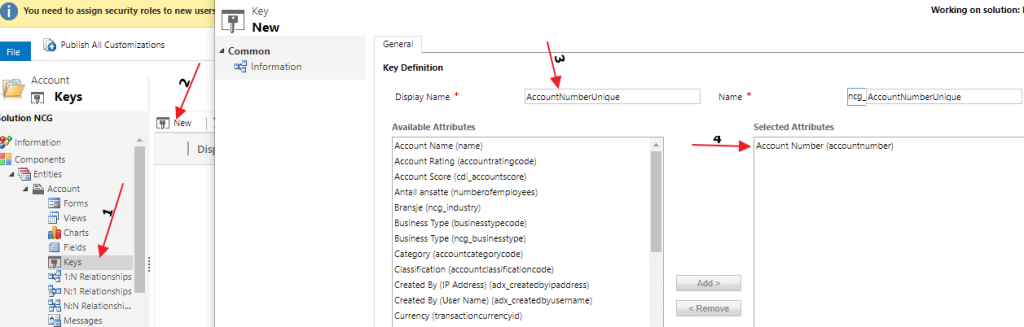
We need to do one config in CRM/CDS before we continue. For the integration to work we need to create a KEY for it to match on. The source doesn’t know of GUID, so I create a key for “Account Number”. In Norway we are lucky that this number is unique and applies to all organization’s.
Open the entity you are integration to (Account for me), and create a new field called KEY. I am choosing to use the “Account Number” field here as my Unique KEY. Remember to publish changes!!
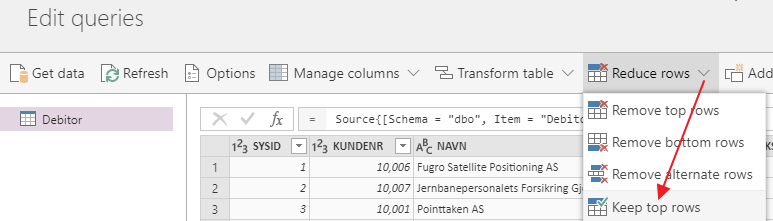
First thing I do is limit the number of accounts while testing.
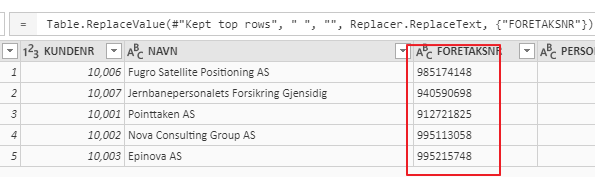
Then I remove all the blank fields in the KEY, to make it equal to the user input in Dynamics. You don’t have to do this, but chose to for simplicity.
In the next step you choose the entity to connect to in CDS/CRM, and map the field. I am choosing to only map “Name” and “Account Number” during the test.
And the magic continues. Here you can setup how often you wan this awesome sync to happen. Our data is fairly static, so once a week is fine:)
Wait until the query is done, and check out the newly created/updated Accounts in Dynamics. This is just a gamechanger for me.
So the On-Premise data Gateway itself might not be the most awesome thing in history, but in combination with the data integration of PowerApps it is just incredible! Carina wrote about this earlier, but I had to see it for myself 🙂
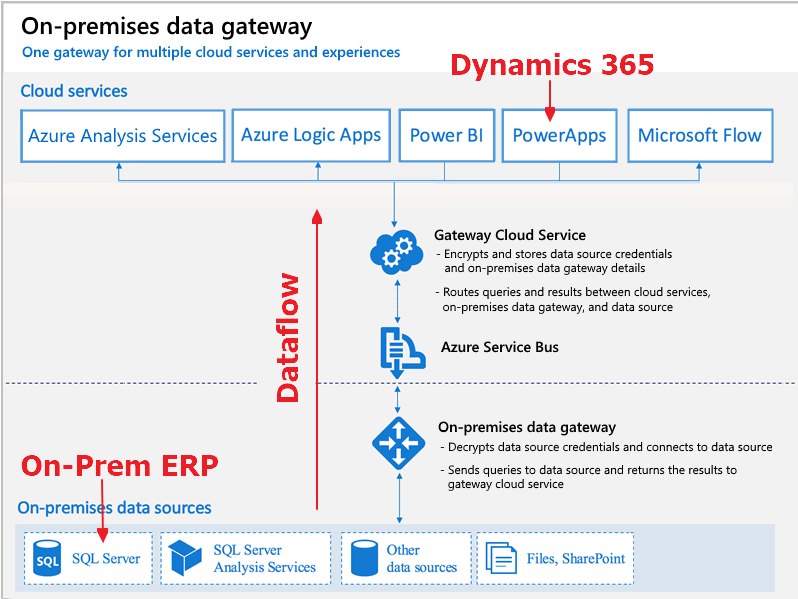
My example is based on the need to integrate my On-Prem ERP (SQL) server with Dynamics 365 online (aka PowerApps).
This method does require that you have username/password credentials to a view in SQL that will allow you to read data. After the setup, Part 2 – Final Finnish.
I need data from On-premise to Online
I needed to integrate my ERP system (On-Premise) to D365 in the cloud. There are several ways to complete this normally with code, SSIS, Scribe etc. I wanted to learn what the PowerPlatform was capable of.
I am not a developer, so I am always seeking for solutions considered No-Code, Low-Code. Integrations was something I always had to involve developers to complete.
The software should be installed on a server, because of the need for 24/7 uptime. While testing, you can easily install the software on your personal computer as long as it is in the same network as the SQL database you are trying to connect to.
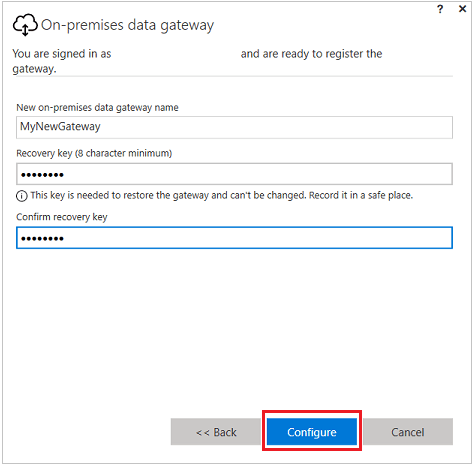
Open the software, and set it up. I chose to use my login credentials for this action. These credentials where also the ones that were “creators” in Dynamics.
Remember the Gateway Name and Password
When this is done you should find the Gateway in your PowerApps. NB!!! It will only install under the Default instance for now!!
Check connection with PowerApps
Last step is to open up your browser to PowerApps and see if we can retrieve the data. Open PowerApps
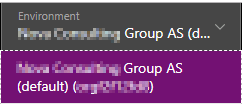
Make sure you navigate to the Dynamics Production environment
Then you open a new integration project
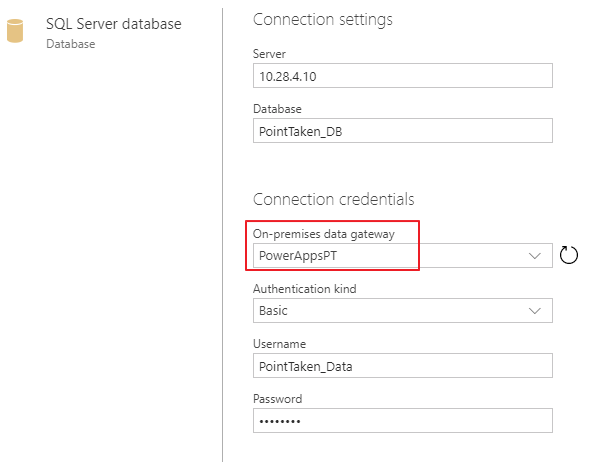
From here you connect to the On-Prem SQL DataGateway. Don’t worry, the credentials and IP are not real here:)
So the important thing on the next step is to use the credentials for your SQL server. These credentials only need to be read from a database. This means that you might have to ask someone to create read credentials for your database.
Choose the tables you want to sync. Debitor is Accounts in our ERP system.
If you are lucky, you will see the following result!! You are now one step closer to actually complete a NO-Code integration with an onprem SQL server.
There are several discussions regarding the use of CDS connector VS the Dynamics connector in the Power Platform. Recently I have been updating my knowledge a lot on PowerApps, PowerBI and Flow. The odd thing is that these environments behave quite different even thought they are so closely connected in regards to connectors.
how much longer will they co exist, and why are they even different?
So here are my thoughts about the current state April 2019 (this might be outdated in one month 😂)
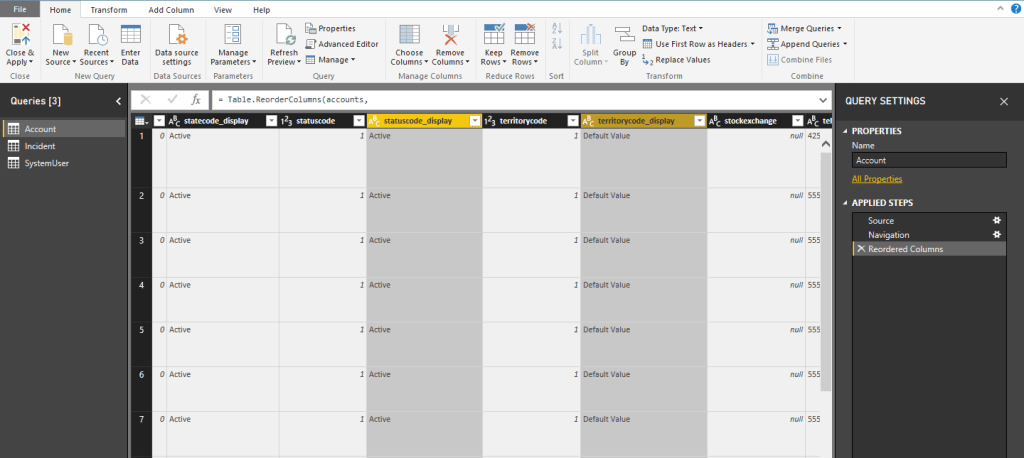
Look at the Yellow columns. They show the display name of the Options Set, so no more need for hacks to convert the fetch from numbers to names. Obviously a huge benefit that this solution will update when the Option Set values update also!
PowerApps CDS vs Dynamics 2 – 1
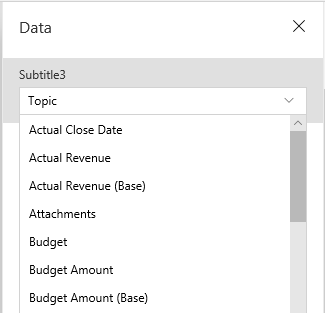
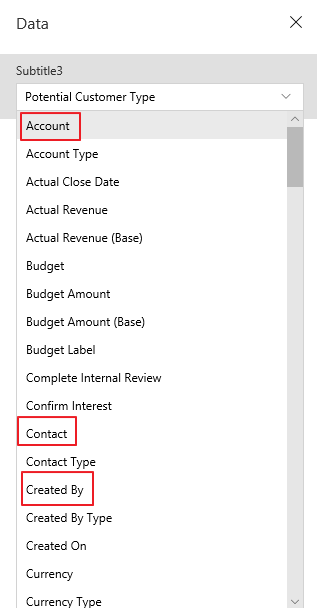
But wait… It might not be over yet. While tampering with lookup controls for PowerApps I found out that CDS simply doesn’t have the lookup fields in the data!
CDS connector (Simply doesn’t have any lookups):
Dynamics Connector (With lookups):
Data presented is still in a GUID state, but there is a workaround for that:)
Ryan is from Scotland, and I couldn’t stop thinking about Breavheart while he was presenting early Friday morning..
Jokes aside, Ryan delivered a great session in the world of a functional consultant. One problem we always have is that we want to solve plugin related issues, but we can’t code. That is why we have these WF tools that give us plugin like features. He is one of the first consultants I have meet that also loves the North52 tool.. hehe.
Great walkthrough of the tools:) remember to donate if they make your work easier 💵 pic.twitter.com/rC1L5DGmYO
— Thomas Sandsør | CRM Keeper 🇳🇴 | MVP (@CrmKeeper) March 29, 2019
Ryan showcased workflows from 6 different solutions. I think we all agreed after the session that we would gladly pay a lump sum to gather all of these awesome people in one room, and make one single tool 😉 Thnx to Ryan, and all of the people behind the free tools!!! Remember to donate if you use the tools.
Marco Amoedo, Wael Hamze – Dynamics 365 Quiz!
Dynamics 365 quiz, and time to shine. Time to show the world that I am the most awesome person within CRM!!
Well, it didn’t quite end like I expected. I was not even in the top 10 list.. haha. The level of knowledge out there is really high, and it makes me want to learn even more for the next time around. I am what you call a sore looser.
Resco – Doctors Without Borders case
Microsoft Norway challenged us to deliver a Pro Bono case to Doctors Without Borders (MSF). They do so much more than just send doctors to countries in crisis. One very important thing they do is survey companies around the world to find out what the standard incomes are pr country pr role. It is very important for companies like MSF not to overpay when they enter countries. By creating inflation, or overpaying doctors, you can end up stealing doctors from the local hospitals.
The combination of Resco + CDS + Power BI was a great fit here for storing and presenting data live. The event in Amsterdam gave us a great chance to work on the app with Resco to improve the look and feel.
When we are done with the case I will write about it in a blog article explaining why I chose the tech that I did etc.
Scott Durow – Power Platform Demystified
I think we all have more questions as things will change over the next months 🙂
Another Scott session packed with people. This session was about the Dynamics platform moving to the Power Plattform in a sense, and what it means in regards to function and licensing at the moment. I am not saying Dynamics is going away, but it is not NOT going away.. hehe.. It will be interesting to follow that the next year.
In the future we will be thinking more about apps than ever before, and that is actually a good thing. Apps will rule the plattform, and it might even make the integrations even better. The more we isolate the functions, the more “product” some of them can be. The more product they are the easier it is to standardize how to work with them.
Just look at our competitors. They are all products, and customers seem to understand that better than plattform stories. Let’s start with the product and then surprise them with the platform #easteregg 😉
Sarah Critchley – Panel discussion
Panel discussion led by Sarah was about AI, Dynamics and PowerPlatform. In the panel we had a good mixture of knowledge. Representation of knowledge here was quite interesting. The talks were about data consumption and data gathering. All sides open about what challenges they were experiencing with data quality in large organizations, and how mindsets of the employers were important to lead in the right direction.
The short story is that our implementations should be focused around actionable insights. As long as the end users se/understand the result of good data, they would feel more ownership to the data entry.
So I shouldn’t really write anything here because I am far to bias… hehe. Malin did a great job presenting a new product from Microsoft called Talent. Talent itself originates from Dynamics AX, but has been refurbished and made a lot better.
The main pieces here are Attract, Onboard and Core HR. each plays vital roles in onboarding new talents, and equally important, maintaining the ones you have. We all know how costly it is to lose a good employee, so why not put a little more effort into keeping the ones we have, and help them develop careers with set goals etc.
Malin has her own blog where you can read more about the product. Her idea is to create all content needed for you to pass the exam for Talent. Much like Neil Parkhurst.
I am just way proud of her as you probably understand 😉
Gus Gonzalez – Top 10 Free Tools for Functional Consultants
For those of you who don’t know Gus, get to know Gus. He works with podcasting, blogging and YouTube channel. He speaks to the technical level of Dynamics that I understand well, and therefore he is awesome;)
This session was about XrmToolBox
“If you are not using XrmToolBox, you are working to hard”.
Gus Gonzalez
I have seen Gus before during Microsoft Inspire and he had the same topic, but that was over 1 year ago. Many of the tools being shown were new to me, and if I only had seen the Attribute Manager earlier !! 😉
NEW tool about to go live is BPF editor. You can now bulk update a view of records to a given step in a PBF.
Megan Walker – Create a visual overview of your customers
Megan Walker session was about empowering Dynamics data within Power BI. The whole session was a live demo, really speaking well to the functional consultants. All of the examples were at a level where you feel that you can do it yourself. It is a must watch for consultants that need to “sexy” up their Power BI demo when presenting from a Dynamics perspective. Best of all is that every example was published on her blog!:)
BONUS: I got to interview Megan for my first ever Video/Podcast, and it will be out as soon as I learn how to edit sound and video..
Microsoft Roundtable
A big part of these Events is meet and greet with people, companies and of course Microsoft. We attended a round table discussion where Microsoft is opening how they want to increase our sales even more. Anyone working with Dynamics for a while has been a trained in Solution Selling, where you focus on pains that you can quantify. You then try to justify the project by fixing the pain, and therefore reducing the cost.
So Microsoft is working on a new industry specific framework for customers, so they can relate to the problems we can help them with. Once I get more information about this I will write more about the customer stories (given that the customer want’s to participate)..
Fredrik Sætre – Extending Power Apps to Power up Operations
Fredrik is a former MVP (now working for Microsoft). He represents the FinOps part of Dynamics, and therefore quite on the opposite side of what I normally listen to. Over the last few years I have heard him speak a few times, and he really is what I would call a Customer Engagement consultant on an FinOps world 😉
He is really enthusiastic about technology (not something I normally feel about the FinOps community), and great at delivering talks. It is interesting to see how FinOps is approaching the CDS story, and PowerApps. Every time I see him talk, there is something new in FinOps and PowerPlattform.
Even though I don’t understand it all, FinOps and logistics is really impressive. When you combine it with PowerPlattform that can surface data, it all makes sense to a CRM person like me:)
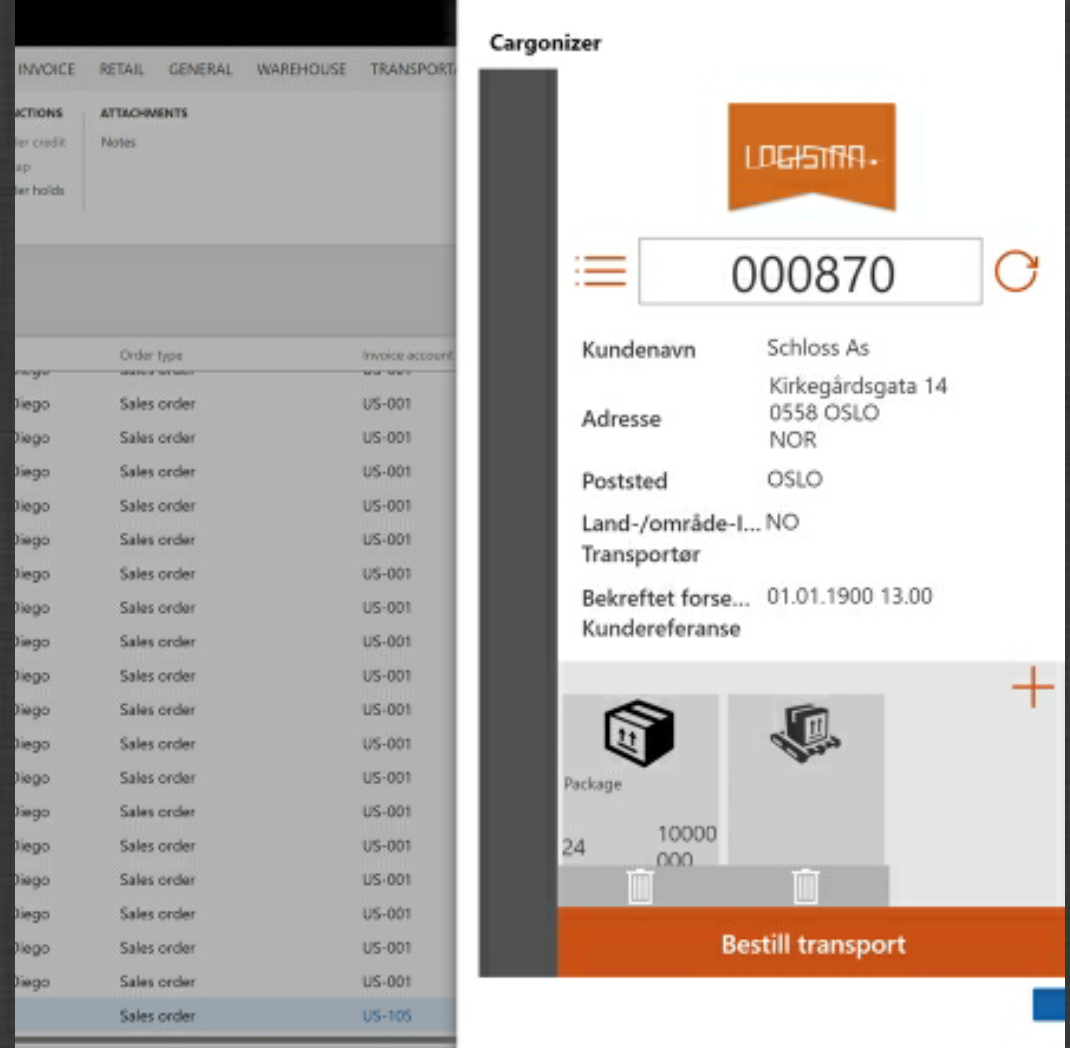
Below was an example from the presentation where he embedded a Canvas app in FinOps.























 CRM Keeper